Author: Donna Wentworth

How to Reconnect Your Sigenergy SigenStor to Wi-Fi

You open the mySigen app and there is no data. The system shows as offline. Before you worry, know this: your battery is almost certainly fine, and you can reconnect your Sigenergy SigenStor to Wi-Fi yourself in a few minutes.

A dropout usually follows a change to your home network, not a fault with the battery. The fix is a short process in the app, with a simple power reset as a backup if the first try does not take.

This guide covers:

  • why your SigenStor drops off Wi-Fi
  • how to tell if your system is still working
  • the step-by-step reconnection process in the mySigen app
  • what to do if your phone will not connect to the battery
  • how to refit the covers once you are done
  • a link at the end to our how to Reconnect Your Sigenergy SigenStor to Wi-Fi video

Why did my SigenStor drop off Wi-Fi?

A SigenStor goes offline when it loses the link to your home network. The most common causes are simple:

  • you changed your Wi-Fi password
  • you changed your Wi-Fi network name
  • you replaced your Wi-Fi router

Any one of these breaks the saved connection. The battery keeps running. It just stops talking to the app, so you lose your live monitoring in the mySigen app until you reconnect it.

Is my battery still working while it is offline?

Yes. While your system is offline it is still working. It is just not uploading data to the app, so what you have lost is the monitoring, not the power.

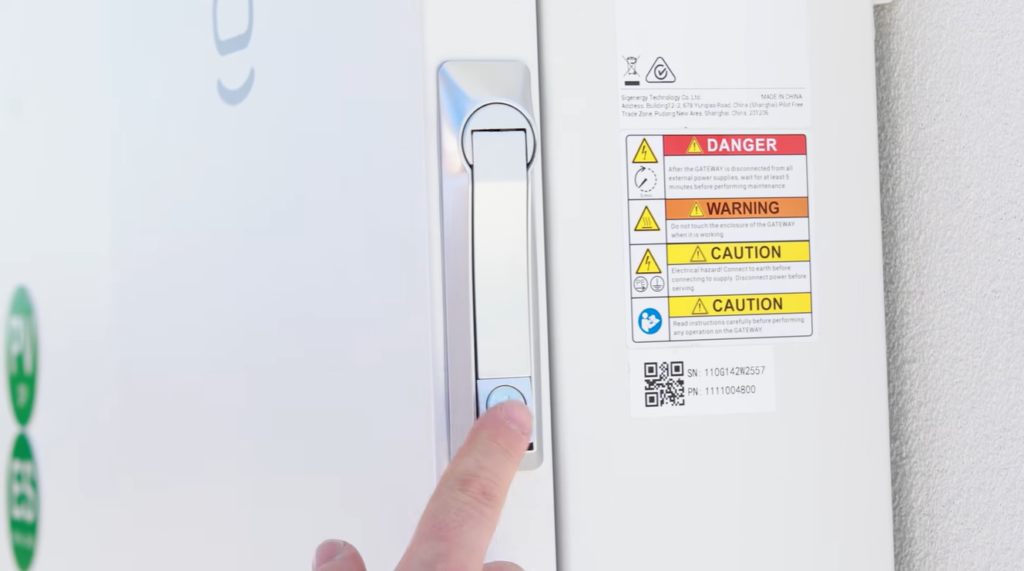
You can check the light in the 12 o’clock position on the battery. When your system has an active internet connection, that light is lit green. If it is not green, the system does not have an active internet connection. 

Hand pressing the Wi-Fi indicator on the SigenStor control dial, the top light you check when you reconnect the SigenStor to Wi-Fi.

That is your sign to run the reconnection steps below.

How do I reconnect my SigenStor to Wi-Fi?

Reconnecting happens through the mySigen app, but first you need to reach the QR code on the inverter.

Start by removing two covers:

  • Remove the top plastic cover on the inverter. Get your fingers into the groove, place your palms on the front of the inverter, and pull towards you.
Lenergy technician removing the top plastic cover from a SigenStor inverter to start reconnecting the Sigenergy SigenStor to Wi-Fi.
  • Remove the right-hand side top plastic cover. You can pull it straight up, firmly and sharply. If that does not shift it, slide a screwdriver or butter knife into the gap and gently pry it upwards.
Hands lifting the right-hand side cover off a SigenStor to reach the QR code and reconnect the Sigenergy SigenStor to Wi-Fi.

Now open the app and connect:

  1. Open the mySigen app.
  2. Tap Settings at the bottom.
mySigen app home screen with Settings circled in the bottom menu, the first step to reconnect a Sigenergy SigenStor to Wi-Fi.
  1. Select Local Connection.
mySigen Settings menu with Local Connection selected to begin SigenStor Wi-Fi setup and reconnect the battery to the network.
  1. Scan the QR code on the battery. Scan the larger top QR code, not the smaller one below it.
Finger pointing to the larger top QR code on the SigenStor, the one to scan when you reconnect the Sigenergy SigenStor to Wi-Fi.
  1. The app shows all available networks. Tap your home network.
mySigen Device Connectivity screen listing nearby networks to pick your home Wi-Fi and reconnect the SigenStor to Wi-Fi.
  1. Enter your Wi-Fi password and tap Join.
  2. Wait a few seconds. Once it connects, tap Finished.
mySigen app showing cloud connection successful and the Finished button after reconnecting the Sigenergy SigenStor to Wi-Fi.

After a few minutes, your system should show as online in the app again.

What if my phone will not connect to the battery?

Sometimes you get an error saying your phone failed to connect to the battery system’s hotspot. 

mySigen error reading connect to device's hotspot fail during SigenStor Wi-Fi reconnection, fixed by power cycling the battery.

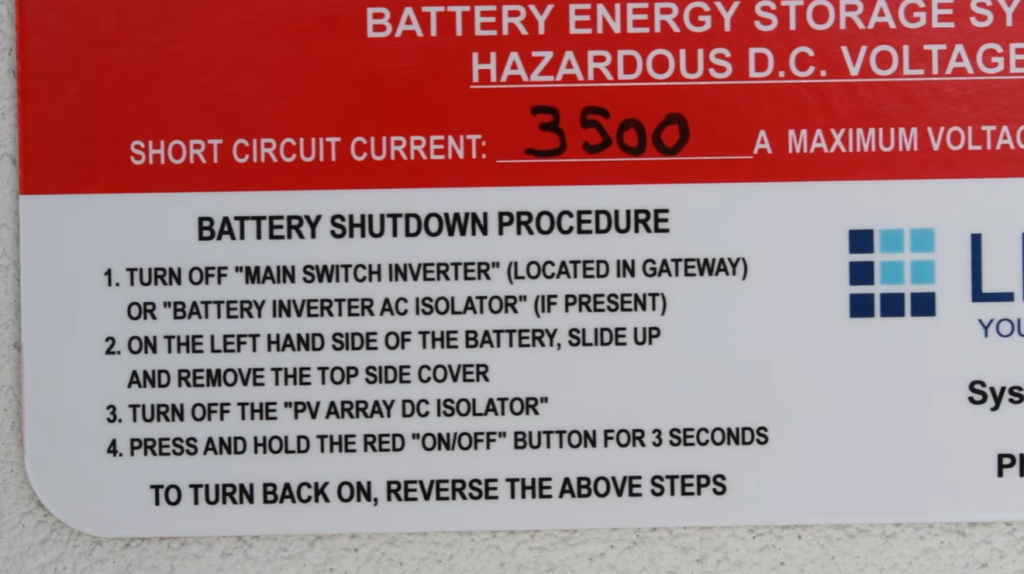
If that happens, you power cycle the battery, which means shutting it off and back on again. This clears most connection errors.

Turn the system off in this order:

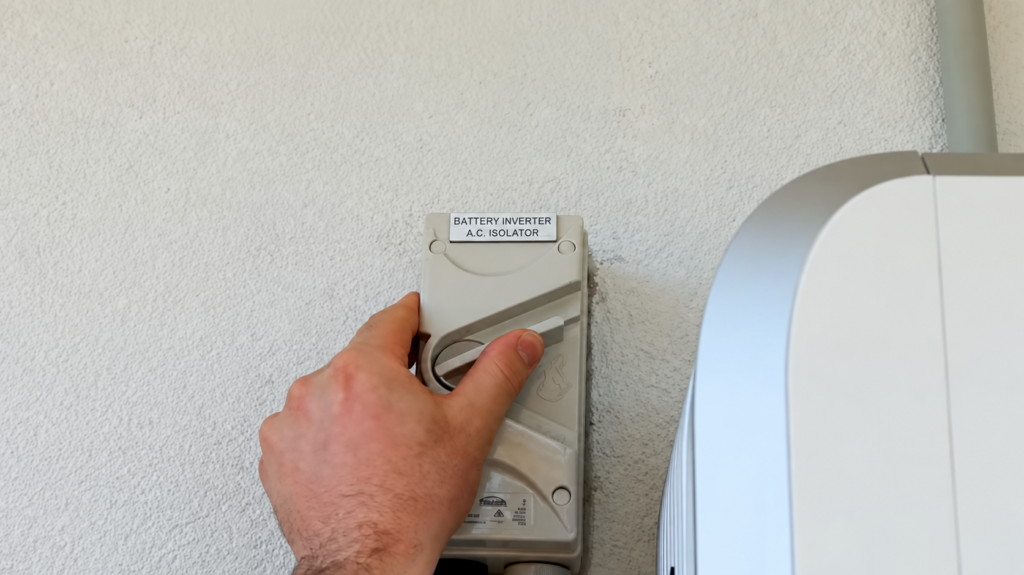
  • Turn off the AC grid supply. If you have an inverter AC isolator, switch it off
Hand switching off the wall-mounted AC isolator to power cycle the battery when the SigenStor will not reconnect to Wi-Fi.
  • If you do not have one, open the gateway,
Lenergy technician Ziad at the open gateway locating the circuit breaker to reset a SigenStor that lost its Wi-Fi connection.
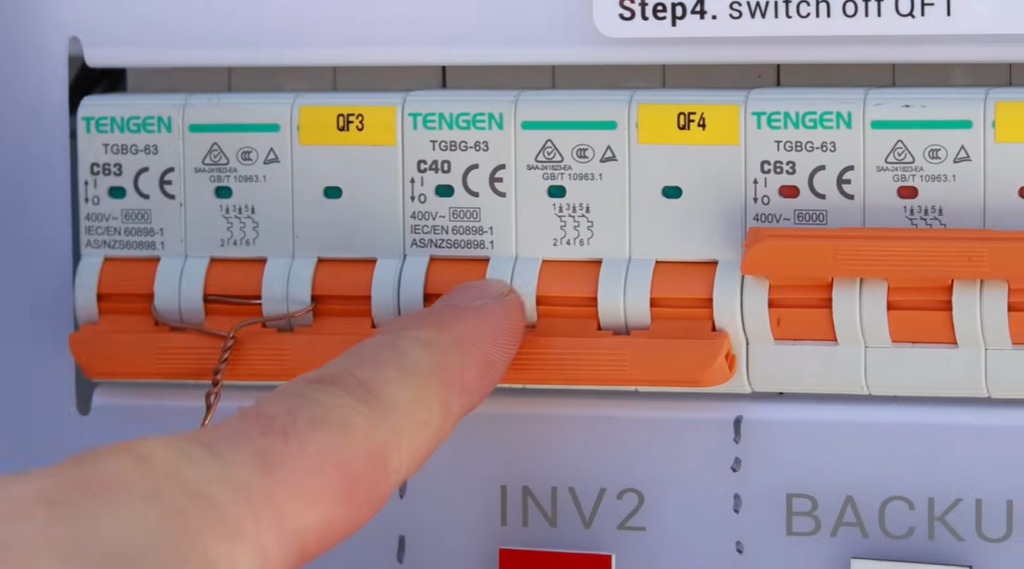
  • find the battery system circuit breaker labelled inverter 1, 2 or 3, and switch that off.
Hand pointing to the inverter breakers INV2 and INV3 in the gateway, switched off to reset the SigenStor Wi-Fi connection.
  • Remove the plastic covers on the left-hand side of the inverter. They lift straight up.
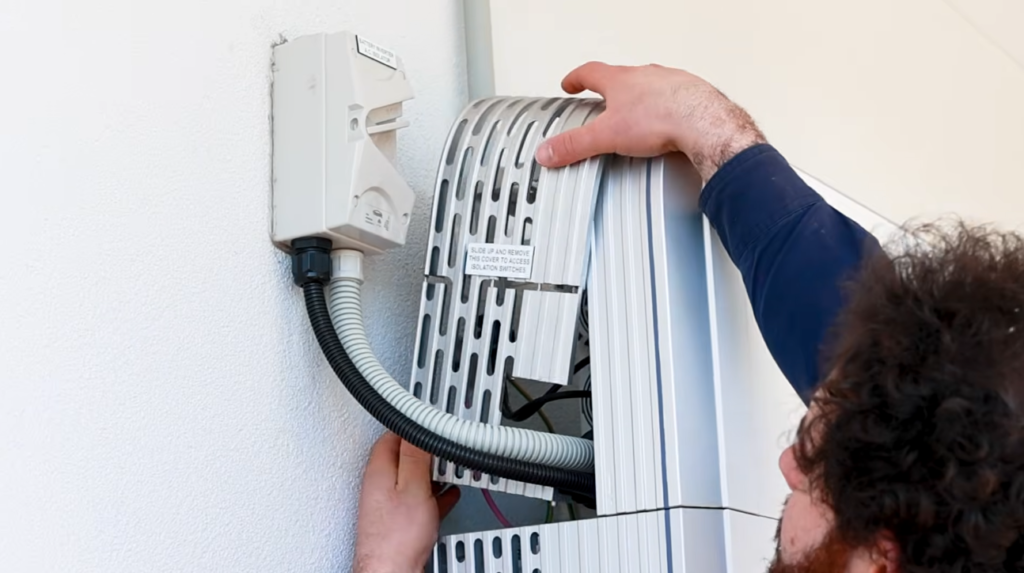
Technician Ziad sliding off the cover to reach the DC isolator and battery switch when resetting the SigenStor Wi-Fi connection.
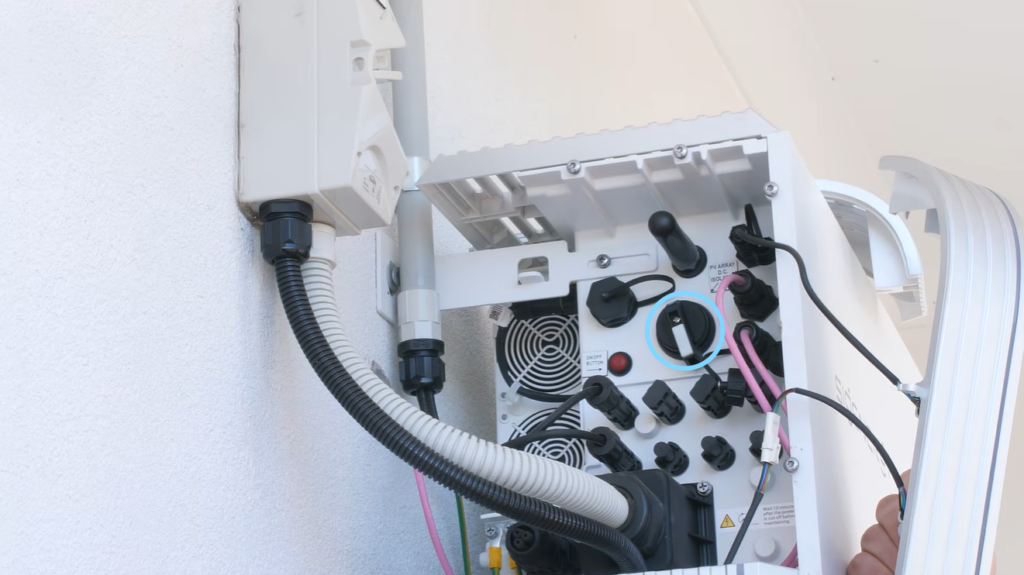
  • Find the PV array DC isolator, also called the DC switch, and move it to off. It is stiff, but it will move. If it is already off, leave it off.
SigenStor DC isolator switch circled in blue, the stiff PV switch you turn off to power cycle and reset the Wi-Fi connection.
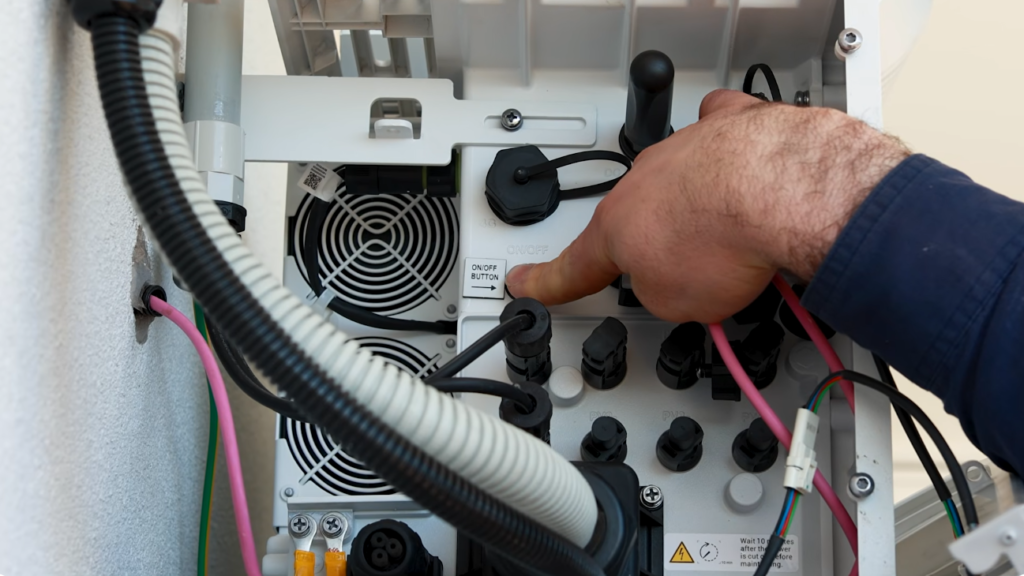
  • Find the red on/off switch and hold it in for 3 seconds. The system shuts down fully. You know it is off when all the lights on the front of the inverter go dark.
Technician Ziad reaching for the red on/off switch and DC isolator on the SigenStor to power cycle and reset its Wi-Fi connection.

Turn the system back on by reversing those steps:

  1. Press and hold the red button for 3 seconds.
  2. Turn the DC switch back on.
  3. Turn the battery system circuit breaker, or AC isolator, back on.

Wait one minute, then run the reconnection process again.

How do I put the covers back on?

Once your system is back online, refit the covers. Each one uses plastic forks that locate onto metal screw heads.

  • Right-hand side cover: line the forks up on the screw heads and push down.
  • Left-hand side covers: both go back the same way, forks onto screw heads.
  • Top cover: locate the forks onto the screw heads, sit the cover on top, sit it forward slightly, then push it to the rear.

That is the whole job. If you are unsure or get stuck on any of these steps, watch the video below or feel free to give our customer support team a call.

Frequently Asked Questions

Why did my Sigenergy SigenStor disconnect from Wi-Fi?

The usual cause is a change to your home network rather than a problem with the battery. Changing your Wi-Fi password, renaming your network, or replacing your router all break the saved connection. Your SigenStor keeps working the whole time. It simply stops sending data to the app until you reconnect it.

How do I reset the Wi-Fi settings on my SigenStor?

Open the mySigen app, tap Settings, then select Local Connection. Scan the larger top QR code on the battery, choose your home network from the list, enter your Wi-Fi password and tap Join. When it connects, tap Finished. Your system should show as online again within a few minutes.

What should I do if my SigenStor won’t reconnect to Wi-Fi after following the steps?

If your phone reports it failed to connect to the battery’s hotspot, power cycle the system: turn off the AC supply, the DC switch and the red on/off switch, then reverse the order to turn it back on. Wait one minute and try again. If it still will not connect and you suspect a fault rather than a network issue, then call our customer support team for a hand.

How Kim’s Solar Powers His EV for $50 a Month

About $50 a month. That is what it costs Kim Leevers to run his electric car. He charges it at home in Renwick, in the Southern Highlands, using solar powered EV charging from his own roof and battery. No petrol station. No fuel bill. Just a steady, low running cost he can count on.

Kim installed solar & a battery to his roof. Now his car runs on the power he makes during the day. This is how he got there, in his own words.

Here is what this story covers:

  • how solar powered EV charging brought Kim’s car running cost down to about $50 a month
  • why Kim never hesitated about going solar
  • what it was like working with Lenergy
  • whether solar can really power an electric vehicle

Can solar really power an electric vehicle?

Yes. Kim is proof of it. His rooftop solar makes electricity through the day. His home battery stores what the house does not use straight away. When his car is home, the charger draws on that stored solar energy instead of grid power.

The result is simple. Kim fuels his car from his own roof, not from a petrol pump. On most days the sun does the work.

Getting the mix right matters here. The solar makes the energy, the battery holds it, and the charger puts it into the car at the right time. If you are weighing up storage for a setup like this read more about how it works in our article on EV’s and Solar here.

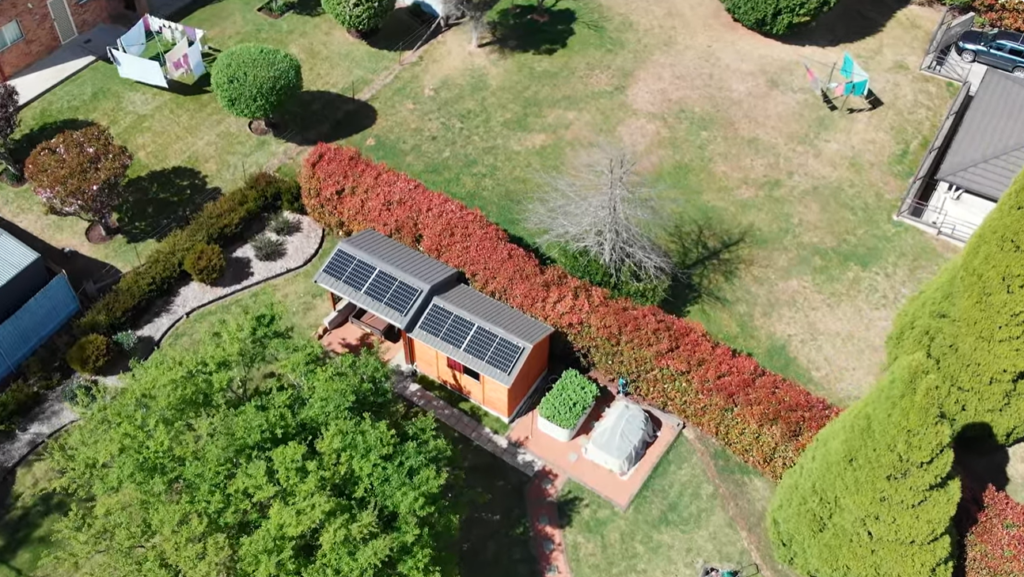
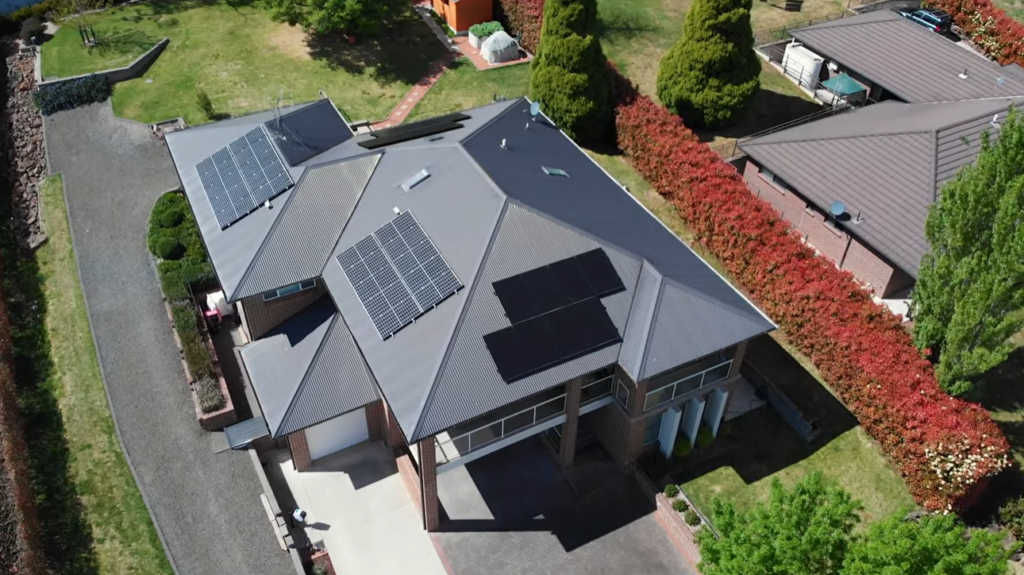
Aerial view of Kim's Southern Highlands home with rooftop solar panels that power his home solar and battery storage and EV charging setup.

Why did Kim go solar in the first place?

For Kim, the planet came first. Money came second.

“Carbon footprint reduction was the primary goal, and economic advantage was the other,” he says. “Firstly it was about reducing my impact on the planet.”

He had wanted solar for a long time. The hold-up was never doubt. It was timing.

“I’ve been pursuing this solar journey for a considerable time, and I never had hesitation once the technology was there for the batteries,” Kim says. “It was just a question of waiting until I could afford it.”

Once he understood what solar could do, the decision felt easy. “As soon as I understood I could get that energy, it just seemed to be an absolute no-brainer,” he says. For Kim, more solar and more EVs on the road add up to something bigger. “The more solar we can get, the more EVs we can get on the road, the better off we’ll be economically, but security-wise and things like that for the future.”

Plenty of homeowners reach the same point. If you already have panels, there are practical reasons to add a battery to your solar that go beyond the bill.

What was it like working with Lenergy?

Kim wanted to be heard, not sold to.

“I can talk to them,” he says. “I can say, look, if that’s not what I want, I want something else. They take the time to listen and understand and figure out what you’re trying to achieve. Whereas a lot of others just want to give you what their package is.”

His results reflect that. Kim’s setup was specially sized to suit how he lives and drives which is why it works so well for him.

How much does it cost Kim to charge his EV?

About $50 a month, by Kim’s own account.

His system has not gone unnoticed on his street. Kim was an early adopter, and his neighbours have taken note.

“They see me now with my charger charging my EV,” he says. “They’re always asking, oh, how much is it costing, are you using the power off the roof?” His answer. “It costs me about $50 a month to run my car.”

Kim Leevers smiling during his interview about his residential solar success story and solar energy for electric vehicles.

His story shows how a well designed solar & battery system helps the environment and provides security against rising energy and fuel prices. Kim’s running cost stays low and steady, because most of the energy comes off his own roof. For anyone watching pump prices climb, that is worth thinking about. 

Here at Lenergy, we design solar, battery and EV setups for homes across NSW and the ACT. If you want to know what solar powered EV charging could look like at your place, we can work through the numbers with you and tell you straight. Get in touch for a free, no-pressure solar and battery quote.

Frequently Asked Questions

Can solar panels really power an electric vehicle?

Yes. Solar panels make electricity during the day, and a home battery stores what you do not use straight away. When your car is home, the charger draws on that solar energy instead of grid power. Kim runs his EV this way in the Southern Highlands and pays about $50 a month to do it. On sunny days, most of the energy your car uses can come straight off your roof.

How much can you save on EV charging costs with a home solar system?

It depends on how much you drive and how much sun your roof gets, so there is no single number. Kim estimates it costs him about $50 a month to run his car on solar powered EV charging. The saving comes from swapping petrol, or grid power, for energy you make yourself. The more of your charging you can do during the day, or from a battery charged by the sun, the lower your running cost.

What size solar and battery system do you need to charge an EV?

There is no one-size answer. It depends on your daily driving, your other energy use, and how much roof space you have. The right size for you comes down to matching storage to how you live and drive, which is worth working through with an installer before you buy.

What the New PDRS Rules Means for Solar Batteries


The NSW battery rebate, the PDRS, just got easier to claim. 

Bigger batteries qualify. No solar requirement. Apartments and businesses, finally in. 

From July 1st, 2026. If you already own a battery or are still crunching the numbers on installing a new one? This one’s for you.

The Peak Demand Reduction Scheme, or PDRS is a rebate scheme. It rewards you for helping cut electricity demand at peak times. For batteries, that mostly means joining a virtual power plant, or VPP.

Here’s what’s in this article:

  • What changed under PDRS on 1 July 2026
  • Why existing battery owners come out ahead
  • New options for apartments, small businesses and larger commercial sites
  • Where new home battery buyers stand
  • What’s next for EVs
 Timeline showing PDRS battery scheme milestones from June 2025 to a future unconfirmed V2G1 date.

What actually is the PDRS?

PDRS is a NSW government scheme. It rewards you for helping cut electricity use at peak times, like a hot summer afternoon. It works through something called Peak Reduction Certificates, or PRCs. Your installer or VPP provider creates these certificates and sells them. The value gets passed back to you.

One thing to know. PDRS only works in NSW. Your home has to be connected to the NSW electricity grid.

Existing battery owners: the incentive just got better.

If you already own a battery, this update is good news.

The rule that applies to you is called BESS2. It rewards you for connecting your battery to a VPP.

Three things changed on 1 July 2026:

  • Bigger batteries can now join, up to 50 kWh, up from 28 kWh
  • You no longer need solar panels to qualify
  • You can now sign your paperwork within 90 days of joining, instead of before you join

One thing to know. Batteries up to 50 kWh can now join. But the payment is still worked out using only the first 28 kWh. So a bigger battery can join the scheme. It just won’t earn extra payment for the part above 28 kWh. If your battery isn’t connected to a VPP yet, now is a good time to look into it. Read more about the Best VPPs for Solar Batteries.

Before and after comparison of BESS2 eligibility rules, showing battery size, solar requirement, and nomination timing changes.

How much can you earn?

This depends on your VPP provider and the certificate price at the time.

As a guide, the government gives one example. In this example the owner of a 42 kWh battery joined the scheme. Only 28 kWh of that counted toward the payment. It would earn 616 certificates, worth $2,156 at a certificate price of $3.50. Exactly how you receive this payment varies depending on the provider, some give you credits on your bills and others provide cash payments.

Treat any number a provider quotes you as a rough guide, not a promise. Certificate prices change, and every provider charges a different fee.

Apartments, small businesses and larger sites can now access PDRS too.

Three new categories start on 1 September 2026. Together, they open the scheme to buildings that couldn’t use it before.

Range chart comparing eligible battery capacity for BESS3 apartment, BESS4 business, and BESS5 commercial and industrial categories.

How does the new apartment battery incentive (BESS3) work?

BESS3 lets an apartment building share one large battery. Before this, each unit would have needed its own battery to take part.

To qualify:

  • The building needs at least 4 apartments
  • There can’t already be a battery on site
  • The battery needs to be sized between 20 kWh and 200 kWh
  • An SAA accredited installer has to fit it outdoors
  • It must be installed on or after 1 September 2026

The more apartments in the building, the bigger the payment can be. Certificates are capped at 5 kWh per apartment. Adding new solar alongside the battery also increases the payment.

Here’s an example the government gives, for a 50 kWh shared battery:

With new solarBattery only
System size25kW solar and 50kWh battery50kWh battery
Total cost pre-incentives$65,000$40,000
STC incentive value$11,076$5,694
PRC incentive value$19,775$14,000
Total cost post-incentives$34,149$20,306
Payback period post-incentives3.2 years4.6 years

Read more about the The Problem with Solar for Strata.

How does the new small business battery incentive (BESS4) work?

BESS4 is for small and medium businesses. It doesn’t apply to homes or data centres.

To qualify:

  • The site can’t have already used BESS4 or BESS5
  • The battery needs to be sized between 20 kWh and 200 kWh
  • An SAA accredited installer has to do the work
  • It must be installed on or after 1 September 2026

The government’s example uses the biggest battery this category allows, 200 kWh:

With new solarBattery only
System size100kW solar and 200kWh battery200kWh battery
Total cost pre-incentives$190,000$125,000
STC incentive value$21,528$0
PRC incentive value$65,800$44,100
Total cost post-incentives$102,672$80,900
Payback period post-incentives3.8 years5.8 years

How does the new commercial and industrial battery incentive (BESS5) work?

BESS5 is for even bigger batteries, from 200 kWh up to 30 MWh. This one is built for large commercial and industrial sites, not homes.

To qualify:

  • The site can’t be a home or a data centre
  • The site can’t have already used BESS4 or BESS5
  • The battery needs to pass a safety test called UL9540A
  • It must be installed on or after 1 September 2026

Even if the battery is bigger, the payment only counts up to 10 MWh. The government’s example uses a 5 MWh system:

With new solarBattery only
System size2.5MW solar and 5MWh battery5MWh battery
Total cost pre-incentives$6,080,000$3,135,000
PRC incentive value$1,646,000$1,103,000
Total cost post-incentives$4,434,000$2,032,000
Payback period post-incentives5.1 years6.5 years

This size of battery is well beyond what a home would ever need. It’s included here so the article covers everything that changed.

Summary table of PDRS battery categories BESS1 through BESS5, showing who each applies to and current status.

Where do new home battery buyers stand?

One thing hasn’t changed. The rule for brand new home batteries, called BESS1, is still on hold. It’s been paused since 30 June 2025, when the federal Cheaper Home Batteries Program took over that role. However, the updates to this scheme do open it up to those considering larger batteries as they are now able to take advantage of the BESS2 as well.

BESS1 currently only applies to government-owned buildings and a few approved programs. For most homes, the federal rebate is the one that applies when you buy a new battery. The rebate is still around you can learn more in our article Have I Missed the Battery Rebate? What Changed in May.

What’s next for EVs?

There’s also a new rule called V2G1. It’s for connecting an electric vehicle to a VPP. It isn’t active yet. It’s waiting on car warranties and technical standards to catch up first. Once it does start, the estimated payment is around $1,700 per vehicle. Read more about how EV’s and solar here.

A team member from Lenergy standing in front of a panel, smiling with a black branded polo with a Lenergy logo

Frequently Asked Questions

What is the PDRS and how does it affect solar battery rebates?

PDRS is a NSW government scheme. It pays you for helping reduce electricity demand at peak times. For batteries, that mainly means joining a VPP.

Am I eligible for a PDRS rebate on a new home battery?

Not through the state rebate. That part of the scheme, BESS1, is on hold for regular households. If you’re buying a new battery, look at the federal Cheaper Home Batteries Program instead.

How much can I save with the updated PDRS incentives?

It depends on your VPP provider and the certificate price at the time. As a guide, a government example showed a battery earning around $2,156 in certificate value, before fees.

Do apartment buildings qualify for a battery incentive now?

Yes, from 1 September 2026. Buildings with at least 4 apartments can share one larger battery, under a new rule called BESS3.

Can small or medium businesses get a battery incentive?

Yes, from 1 September 2026, under a new rule called BESS4. It applies as long as the site isn’t a home or data centre.

How to Get 3 Free Hours of Energy With AGL, Origin and Energy Australia

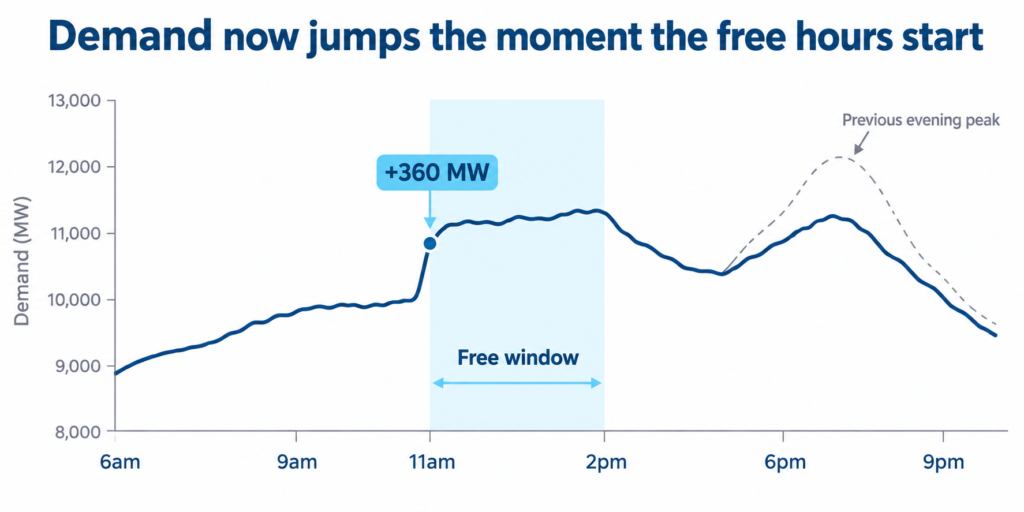
Free electricity between 11am and 2pm. The plan was to have all energy retailers providing the solar sharer offer by now but it’s all gotten very complicated and here’s why.

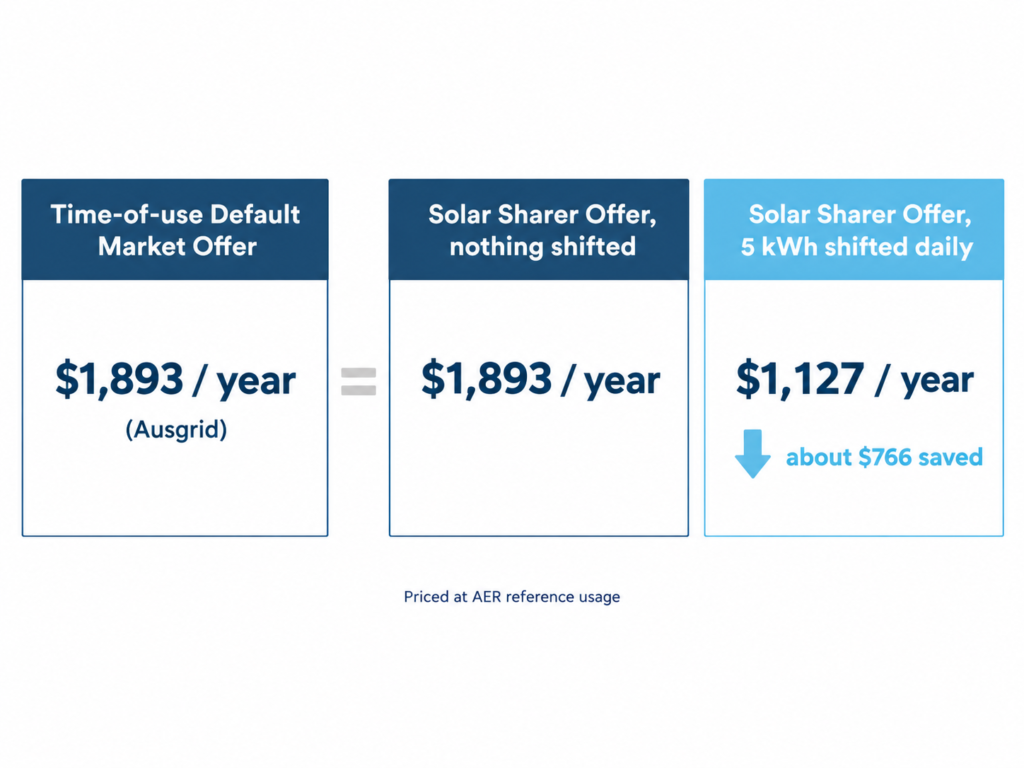
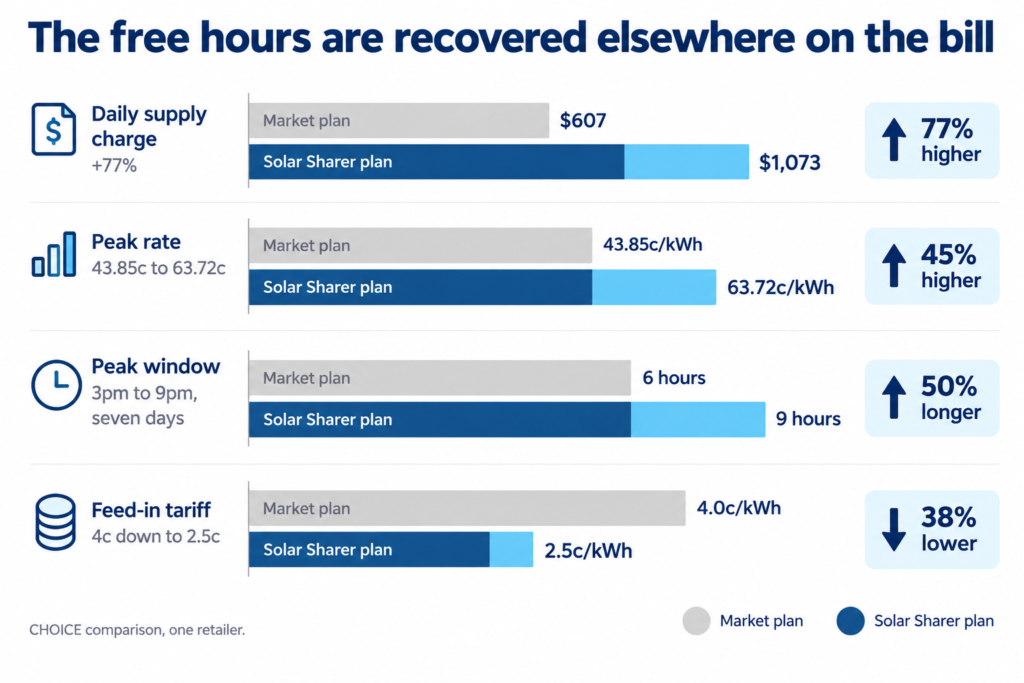
AGL and Origin have both launched Solar Sharer plans this year. Energy Australia hasn’t yet. The actual rate cards from AGL and Origin show a trade-off worth understanding before you switch. The free midday window comes with a peak rate around a third higher than their standard solar plans. That’s not automatically a bad deal, it depends entirely on whether your household can shift its biggest energy use into the middle of the day. If it can’t, you could end up paying more, not less.

There’s another factor worth knowing before you look at the numbers below. Supply charges across AGL, Origin and Energy Australia have all just gone up, with many customers reporting increases of around 30% in the past week or so. This has happened across standard plans and Solar Sharer plans alike, so it isn’t something switching to the free hours caused. The rates in this guide are current as of now, but treat them as a snapshot rather than a guarantee, and compare your own recent bill before switching plans.

Disclaimer: All the rates in this article a based on a household in Sydney. Rates can vary significantly according to location.

This guide covers:

  • What the Solar Sharer Offer actually is
  • Where it applies, and where it doesn’t yet
  • How AGL and Origin’s Solar Sharer rates compare to their own standard solar plans
  • What Energy Australia customers are paying right now, with no Solar Sharer plan live
  • Whether the free hours are actually worth it for your household

What is the Solar Sharer Offer?

The Solar Sharer Offer (SSO) is part of the Default Market Offer (DMO) reforms. Retailers with more than 1,000 customers in DMO areas are legally required to provide it.

The core rules are the same everywhere it applies:

  • Three hours of free daytime electricity, capped at 24 kWh per day
  • Requires a smart meter
  • No rooftop solar needed to qualify
  • Open to renters, not just homeowners
  • Not available on embedded networks (most apartment blocks and retirement villages)

The free window is fixed year round and doesn’t move with daylight saving.

Timeline of a full day showing the free electricity window from 11am to 2pm highlighted in blue, next to the evening peak period from 3pm to 9pm shown in navy.

Where does the free energy offer apply?

The SSO only applies in the states covered by the DMO: New South Wales, South Australia and South East Queensland.

  • NSW and South East Queensland: free electricity from 11am to 2pm
  • South Australia: free electricity from 12pm to 3pm

It doesn’t currently extend to the ACT, which sits outside the DMO framework and runs its own separate market arrangement. If you’re in the ACT, or in Queensland outside the South East corner, check with your retailer directly, as the standard SSO rules may not apply to you yet.

Map of eastern Australia highlighting NSW, South East Queensland and South Australia in blue as areas covered by the Solar Sharer offer, with the ACT and regional Queensland shown in grey as not yet covered.

AGL: Solar Sharer vs its standard solar plan

AGL’s Solar Sharer plan gives you free power for the first 24 kWh used between 11am and 2pm. Peak rates apply 3pm to 9pm daily, but only during summer (1 November to 31 March) and winter (1 June to 31 August). Outside those hours and months, off-peak rates apply.

Here’s how it compares to AGL’s standard time-of-use plan for solar households, Solar Savers:

ChargeAGL Solar SharerAGL Solar Savers (standard)
Midday windowFree, first 24 kWh/dayNot offered
Peak (3pm–9pm, summer/winter)63.7 c/kWh46.6 c/kWh (summer) / 47.1 c/kWh (winter)
Off-peak27.6 c/kWh35.7 c/kWh
ShoulderNot applicable12.3 c/kWh
Supply charge176.2 c/day (~$1.76)185.1 c/day (~$1.85)
Solar feed-in tariff0.0 c/kWh8 c/kWh (first 8 kWh/day), 3 c/kWh after

The free window looks great on paper. The catch is the peak rate. It’s around 37% higher on the Solar Sharer plan than on AGL’s standard solar plan. If your household uses a lot of power during the 3pm to 9pm peak, the Solar Sharer plan could end up costing more overall, even with three free hours included. It does have a lower off-peak rate and a slightly lower supply charge than the standard plan, so if most of your remaining usage falls off-peak or inside the free window, you may still come out ahead.

AGL’s Solar Sharer plan pays a 0 c/kWh feed-in tariff. If your household exports solar power, you won’t be paid for it at all on this plan, compared to up to 8 c/kWh on Solar Savers. For homes with solar panels, that’s a real cost stacked on top of the higher peak rate, and it’s worth weighing carefully before switching.

Origin: Solar Sharer vs its standard solar plan

Origin’s Solar Sharer plan follows the same shape. Free usage for the first 24 kWh in the midday window, then standard rates apply above that.

ChargeOrigin Solar SharerOrigin Solar Soaker (standard)
Midday windowFree, first 24 kWh/day12.4 c/kWh, discounted but not free
Usage above 24 kWh in the window27.6 c/kWhNot applicable
Peak63.7 c/kWh46.6 c/kWh (summer) / 47.1 c/kWh (winter)
Off-peak27.6 c/kWh35.7 c/kWh
Supply charge176.4 c/day (~$1.76), plus 4.7 c/day if on a controlled load185.1 c/day (~$1.85)
Solar credit3.0 c/kWh8.0 c/kWh

The pattern is almost identical to AGL. Origin has opted to continue to provide some credit for exported energy, however, with a notably higher peak rate on the Solar Sharer plan, offset by a lower off-peak rate and a slightly lower supply charge. If you’re on a controlled load circuit, such as a separately metered hot water system, the Solar Sharer plan adds a small daily charge for that too.

Bar chart comparing peak rate, off-peak rate and supply charge across AGL Solar Sharer, AGL Solar Savers, Origin Solar Sharer, Origin Solar Soaker and Energy Australia's standard plan, showing Solar Sharer plans with a notably higher peak rate.

Energy Australia: what you’re paying now, with no Solar Sharer offer yet

Energy Australia: what you’re paying now, with no Solar Sharer plan yet

Energy Australia hasn’t launched its Solar Sharer offer, but its own website confirms several details for anyone waiting on it. It’ll be a standalone plan, you’ll need to actively opt in and switch, it won’t happen automatically. The free window matches AGL and Origin: 11am to 2pm in NSW and QLD, and 12pm to 3pm in SA. A smart meter is required, and the daily supply charge and any controlled load charges will still apply on top of the free usage.

One detail is worth flagging now. Energy Australia’s 24 kWh cap won’t reset strictly every day, it’s averaged across your whole billing period. Its own example: using 14 kWh one day and 34 kWh the next still averages to 24 kWh a day, so both days stay within the cap.

Energy Australia hasn’t published usage rates for the plan itself, it says these will be available closer to launch. Here’s what its current standard rates look like, for context:

ChargeRate
Supply charge170.2 c/day (~$1.70)
Peak (summer Nov–Mar, winter Jun–Aug)55.6 c/kWh
Peak/shoulder (autumn Apr–May, spring Sep–Oct)27.5 c/kWh
Off-peak (year round)23.5 c/kWh
Dedicated circuit18.2 c/kWh
Solar feed-in tariff3.0 c/kWh (excl GST)

Reports suggest Energy Australia’s launch may not happen until September 2026. Federal Energy Minister Chris Bowen has said he’s disappointed by the delay and reminded affected customers they have the right to switch to a retailer that already complies.

Should you switch, or wait and see?

Proceed with care rather than switching on the headline alone.

  • Compare the full rate card, not just the free hours. On the plans above, the peak rate is the real cost driver, not the supply charge.
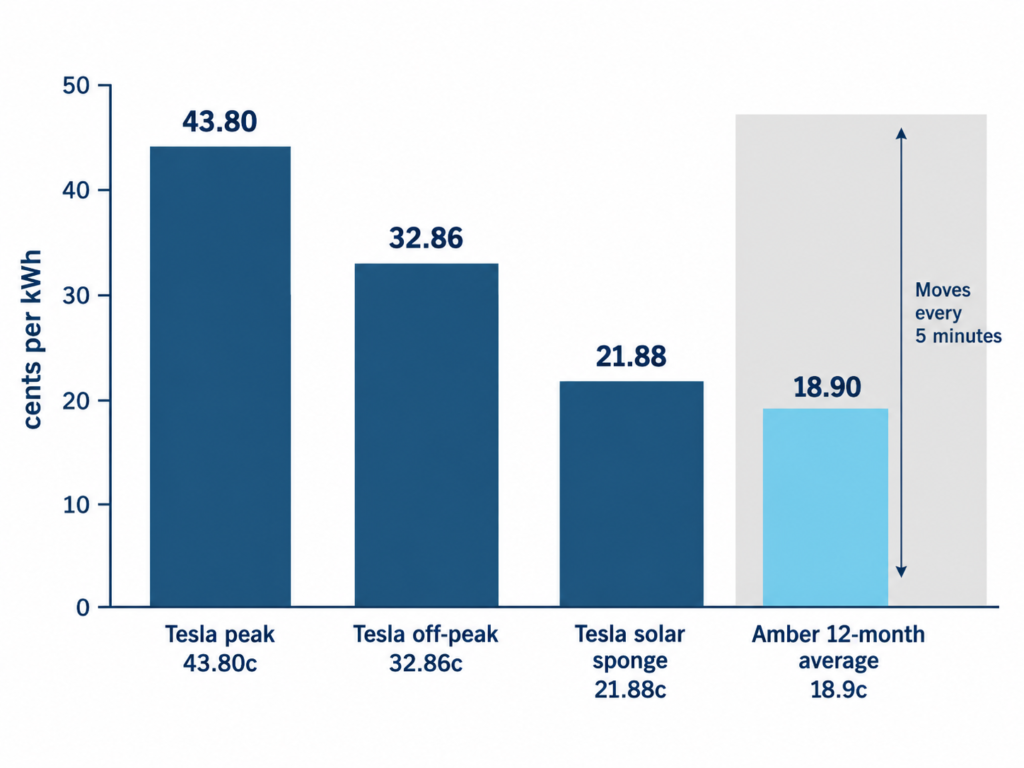
  • Work out how much of your usage actually happens in the 11am to 2pm window right now, and how much happens during the evening peak. If your household is out at work all day and cooking dinner at 6pm, a higher peak rate could outweigh the free hours.
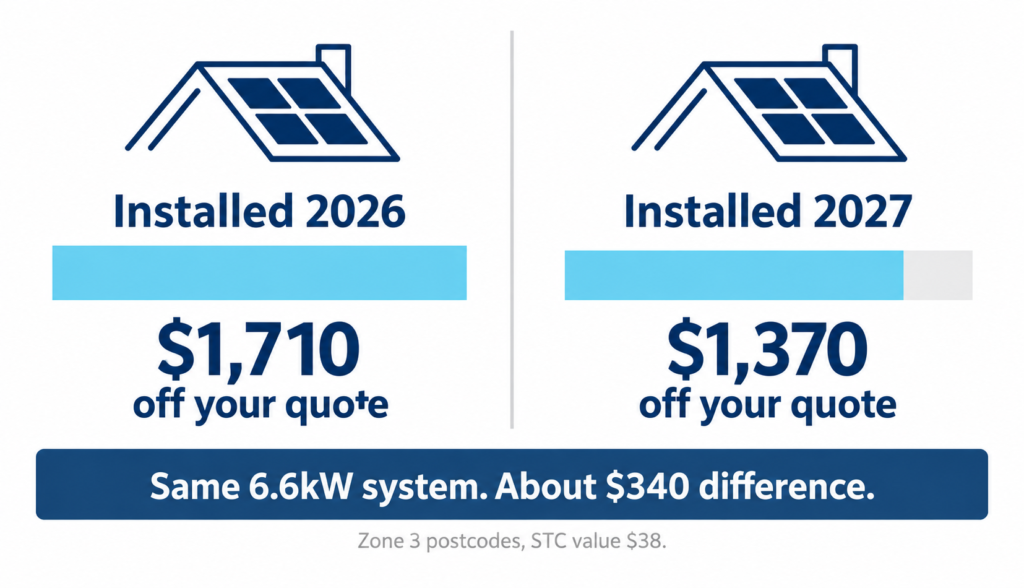
  • A home battery changes the maths. Charging a battery, like the SigenStor, for free during the midday window and drawing on it during the expensive evening peak avoids the higher peak rate altogether, rather than paying it.
  • If you already have solar panels, check the feed-in tariff too. AGL’s Solar Sharer plan pays 0 c/kWh for exported solar, against up to 8 c/kWh on its standard plan. That’s a genuine loss for solar-owning households, on top of the higher peak rate. 
  • Rates can move again, and recently already have. Supply charges rose across the board about a week ago. Treat today’s numbers as a snapshot, and recheck the current rate card before committing.

Read more on how to take advantage of this offer here.

Split panel comparing households likely to benefit from the Solar Sharer offer, such as those home during the day, against households who should think twice, such as those mostly using power in the evening.

Am I eligible? Common blockers explained

  • Renting? You’re still eligible. Solar Sharer doesn’t require you to own your home or your panels.
  • No solar panels? That’s fine too. The offer isn’t tied to having rooftop solar.
  • Basic electricity meter? You’ll need to upgrade to a smart meter first. Contact your retailer to arrange this.
  • Living in an apartment or retirement village? If your building is on an embedded network (a private internal grid), you’re not eligible unless you have your own direct smart meter connection.
Grid of four icons showing eligibility for the Solar Sharer offer: renters eligible, no solar panels needed, smart meter required, and apartments on embedded networks not eligible.

How do I sign up to the Solar Sharer Offer?

  1. Confirm you’re in an eligible area: NSW, South East Queensland or South Australia.
  2. Check you have a smart meter. If not, ask your retailer to arrange one.
  3. Get the full rate card for the Solar Sharer plan, not just the headline, and compare it against your current plan.
  4. Work out how much of your usage you can realistically shift into the free window.
  5. Opt in only if the numbers work in your favour. Some retailers apply the offer automatically, others need you to switch plans.
Lincoln from Lenergy standing in front of branded neon sign smiling.

Frequently Asked Questions

What is the Solar Sharer offer and how does it work?

It’s a government mandated offer giving eligible customers three hours of free daytime electricity, capped at 24 kWh, in exchange for shifting usage away from the evening peak.

Am I eligible for the 3 free hours of energy offer with AGL, Origin, or Energy Australia?

You need to be in NSW, South East Queensland or South Australia, on a smart meter, and not on an embedded network. Solar panels and homeownership aren’t required.

When are the free energy hours available under the Solar Sharer program?

11am to 2pm in NSW and South East Queensland, and 12pm to 3pm in South Australia. AGL’s own plan currently runs the same hours but priced differently outside the window.

Will the Solar Sharer offer actually save me money?

It depends on your usage. On AGL and Origin’s current plans, the peak rate is around a third higher than their standard solar plans. If you can shift meaningful usage into the free window, or you have a battery to store it, you’re likely to come out ahead. If most of your usage happens during the evening peak and can’t move, you could end up paying more overall. Compare the full rate card before switching.

From Blackouts to Battery Backup: Peter’s Story

Peter Dymond has had solar for years. He never had a solar battery. The maths never worked.

He lives at Lakesland, near Picton, right at the end of the power line. Storms roll through and his street is often one of the first to lose power and one of the last to get it back.

For years he ran the numbers on a home battery and kept getting the same answer. Too expensive. Payback well over ten years. Then a recent solar battery rebate changed the sums, and his payback dropped to around eight years. Peter finally said yes.

This article covers:

  • Why Peter started looking at a home battery after years of saying no
  • How the solar battery rebate changed his payback period
  • Why he chose Lenergy over a bigger name provider
  • What his SigenStor battery system actually looks like

Why Did Peter Start Looking at a Home Battery?

“I’ve had solar for many, many years,” Peter says. He upgraded his existing system about two years ago, and a battery was always the next question. The answer kept being no.

“They were just too expensive for a long time,” he says. “The recent government rebate made it a lot more affordable, and the payback sort of worked.”

Cost wasn’t the only reason. “Where we are is the end of a power line, and it’s a little bit unreliable,” he says. “I was really looking for that extra bit of security on the power supply.”

What Was the Real Problem a Battery Needed to Solve?

Peter names two goals, and neither one alone would have been enough.

“We regularly get blackouts in a storm here,” he says. That’s the reliability side. The other is money. “In years gone by, I looked at it and couldn’t get it to be worthwhile. It wouldn’t pay back under ten years,” he says.

He needed backup power that also made financial sense. The rebate is what finally delivered both.

Aerial view of a large rural home with multiple rooftop solar panel arrays, surrounded by trees and open grounds on a sunny day.

How Did the Solar Battery Rebate Change Peter’s Payback Period?

This is the detail that moved Peter from years of hesitation to a signed job.

“With the recent rebates, when they cut the numbers, the payback period was looking at around eight years,” he says. “I certainly seem to be on track for that with the experience I’ve had so far.”

It’s worth understanding how the current battery rebate works before you run your own numbers, since the details shift as programs change. Read more about that here.

Why Did Peter Choose Lenergy?

“I actually got a referral from a cousin of mine who’d recently installed one,” Peter says. From there he looked around at local providers.

“Previously with the solar I had a bigger name provider, but I was unhappy with their service,” he says. “So I thought I’d go with a local provider.”

What Was It Like Working With Lenergy?

“I was really impressed with the team,” Peter says. Matthew handled the initial engagement.

“He was very informative,” Peter says. “He was verifying everything my cousin had told me, and he gave me some really good information in what I thought was an unbiased way.”

Peter stands beside a home solar battery and inverter, with the battery partly screened by a protective lattice outdoors.

What Battery System Did Peter Install?

Peter’s system is a single Sigenergy SigenStor, a 48.36kWh LiFePO4 battery with 46.8kWh usable, paired with a Sigen Hybrid inverter running 12kW on a single phase connection. It sits alongside his existing solar array rather than replacing it.

If you’re weighing up how to size a battery for your own home, inverter capacity matters as much as battery size.

Would you recommend Lenergy to others? “I definitely would. I don’t often give referrals or endorsements,” Peter says. “But after the job was installed here, I was impressed with the team.”

Considering whether a battery makes sense for your place? Read our guide on mistakes to avoid when buying a solar battery.

Frequently Asked Questions

How does the solar battery rebate work?

Government battery rebates generally reduce the upfront cost of an eligible battery system, which shortens the payback period. Eligibility, amounts and included brands change over time, so check the current rules before assuming a specific figure applies to you.

How long is the payback period for a solar battery with the rebate?

It depends on your system size, usage and the rebate available when you install. Peter’s own estimate, based on his experience so far, is around eight years with the current rebate applied, down from an unworkable ten-plus years before it.

Can a solar battery protect my home from blackouts?

Yes. A battery stores power so your home can keep running when the grid goes down, which matters most for properties like Peter’s at the end of a power line where outages are more frequent.

Do I need new solar panels to add a battery?

No. A battery can usually be added to an existing solar system, provided the inverter and battery are correctly sized to work with what you already have.

The Problem With Solar Batteries and Cold Weather

On the coldest mornings, a solar battery can lose up to half its usable energy. It isn’t broken. That’s cold weather at work.

Cold slows the chemistry, slows charging, and trims what you can actually use. It rarely damages a good battery. It can leave a cheaper one stalling when you need it most. The fix comes down to two things. Pick a battery built for the cold. Put it in the right spot.

This article covers:

  • Why cold weather affects solar battery performance
  • What happens to charging when temperatures drop
  • Whether it really matters in NSW and the ACT
  • How to protect your battery through winter
  • How the SigenStor is built to handle it

Why does cold weather affect solar battery performance?

It comes down to chemistry.

A lithium battery holds an electrolyte that lets lithium ions move between the electrodes. That movement is how it charges and discharges. Cold lowers the electrolyte’s conductivity. The ions move slower. Internal resistance climbs.

The result is a temporary drop in capacity. Your battery still works. It just can’t deliver as much for a while. Batteries perform best at around 21°C. Below that, output starts to ease off.

Some figures put the drop at 20 to 50 per cent once it falls below freezing, though Australian conditions are usually milder than that.

Diagram comparing lithium ion movement in a battery cell at 21 degrees, where ions move easily, versus in the cold, where they move slowly with higher resistance.

Here’s the part most people miss. Discharging in the cold is mostly fine. Charging is the real problem.

What happens to charging when it gets cold?

Lithium batteries don’t like charging in the cold.

Below about 0°C, charging can make lithium build up on the cell surface instead of storing properly. This is called lithium plating. It can permanently damage the battery, and in bad cases it becomes a safety risk.

So the battery protects itself. The Battery Management System (the BMS) slows or stops charging until the cells warm up. Discharging usually keeps working at lower temperatures.

That’s a sensible safeguard. It also creates a catch. A cheaper battery with no heater just waits for the day to warm up. In a cold snap, it might not charge fast enough, or at all.

Vertical temperature scale showing how a solar battery behaves from 21 degrees down to below freezing, where charging may stop.
TemperatureWhat your battery does
Around 21°CPerforms at its best
5 to 10°CCharges and discharges a little slower, slight dip in usable capacity
Near 0°CCharging limited or paused to protect the cells, discharge still works
Well below 0°C, no heaterCharging may stop until the battery warms up

Does cold weather actually matter for batteries in NSW and the ACT?

Australian winters are mild next to Canada or the northern United States. Cold alone rarely damages a quality battery here.

That doesn’t mean it’s a non-issue.

The ACT and the NSW highlands get real frosts. Mornings near or below zero are normal in winter. Outdoor and garage installs feel it most.

There’s a second problem stacked on top. Winter solar generation drops sharply. One Australian example saw a system make 2,256 kWh in December and just 1,002 kWh the following June, less than half. Shorter days. Lower sun. More cloud.

Bar chart comparing one solar system's output, 2,256 kWh in December against 1,002 kWh in June, less than half.

So two things happen at once. Your panels make less. Your battery may charge slower. Meanwhile your home draws more power for heating and hot water. A battery that can’t fill in winter is a real cost, not just an annoyance.

How do you protect a solar battery from the cold?

Good news. Most of this is solved at the design stage.

  • Choose a battery built for the cold. Look for active heating and a wide operating temperature range. This is the single biggest factor.
  • Site it well. A garage or sheltered spot beats a fully exposed wall. Any battery installed outdoors needs an IP rating of at least IP65. Most clear that comfortably but it is worth checking.
  • Don’t wrap it yourself. DIY blankets or covers can trap heat and cause overheating or faster wear. Manufacturers warn against it.
  • Size for winter, not summer. Use winter sun hours, not annual averages. A large battery needs enough solar to actually fill it.
  • Check your charging options. Some systems can top up from the grid in cheap off-peak windows, which helps when solar is short.

Get these right and a cold morning becomes a non-event.

Icon grid of five ways to protect a solar battery in cold weather: active heating, sheltered siting, no DIY insulation, winter sizing, off-peak charging.

What makes the SigenStor different in the cold?

The SigenStor is built for this exact problem.

It uses LFP (lithium iron phosphate) chemistry, which is stable and handles temperature well. Each battery module has a built-in heating pad. When the cells get too cold, the heater switches on, warms them to a safe level, usually in under two hours, then charging carries on. It runs automatically in the background, and you can set your own heating times if you want to. You don’t lift a finger.

Its rated operating range runs from -20°C to 55°C. That covers an Australian winter comfortably, including frosty mornings in the ACT and southern NSW. For outdoor installs, it carries an IP66 weatherproof rating.

The numbers back it up. Storage is rated down to -25°C. The battery and energy controller each carry a 10-year warranty.

Want to keep reading? Learn about how to take advantage of the three free hours of power here.

Labelled diagram of a SigenStor battery showing its heating pad, LFP chemistry, minus 20 to 55 degree operating range and IP66 weatherproof rating.

Frequently Asked Questions

How does cold weather affect solar battery performance?

Cold slows the chemistry inside the battery. Capacity dips for a while, and charging slows or pauses to protect the cells. Discharging usually keeps working. A battery with active heating avoids most of this.

What temperature is too cold for a solar battery?

Charging becomes a problem at around 0°C and below, which is when a good battery’s heater steps in. Discharging tolerates lower temperatures. Exact limits vary by battery, so check the datasheet.

Can the SigenStor solar battery operate in freezing temperatures?

Yes. Its built-in heating pad and -20°C to 55°C operating range are made for sub-zero mornings, so it keeps charging when many batteries would pause.

What Happens During a Blackout With Solar?

Most Australian homes with solar go dark during a blackout. Even on a sunny day. Even with panels on the roof. Here’s why that happens, and exactly what it takes to keep your power on when the grid fails.

The short answer: standard solar alone will not save you. 

This article walks through what your solar system actually does during a power outage, why it shuts off, what types of systems can keep running, and what you should be asking before your next upgrade.

Do Solar Panels Still Generate Power During a Blackout?

Yes, and this is the part that surprises most people. Your solar panels are generating DC electricity whenever there is enough sunlight. 

The problem is not the panels. It is what happens next. That DC electricity has to pass through your inverter before it becomes usable AC power for your home. During a blackout, most inverters in Australia shut themselves off completely. The energy your panels are generating has nowhere to go.

So yes, your panels are working. No, that does not mean you have power.

Why Does My Solar System Turn Off When the Grid Goes Down?

The vast majority of solar systems installed in Australian homes are grid-tied. When the grid fails, these systems shut down immediately.

This is called anti-islanding protection or backfeed protection, and it is required by Australian Standard AS/NZS 4777.2. Every grid-connected inverter sold in Australia must comply with it.

Why the Shutdown Exists

When there is a blackout, the power lines running down your street are de-energised. Network crews go out to work on those lines to restore supply. If your solar system kept pushing electricity back into those lines while someone was on them, it could kill them.

Your inverter detects the loss of grid power and cuts the connection automatically. 

The result: even on a bright sunny day, your panels keep generating and your inverter does nothing with it. Lights out, appliances off, same as your neighbours who have no solar at all. 

When Can Solar Keep Working During a Power Outage?

There are certain inverters that are capable of what is called islanding. Islanding is when an inverter safely disconnects from the grid, forms a self-contained power network just for your home, and keeps supplying power from solar and battery.

Split-panel diagram comparing a standard solar system and an islanding-capable system during a blackout, showing one home without power and the other operating normally.

Grid-Following vs Grid-Forming: The Core Difference

A standard grid-tied inverter is what engineers call grid-following. It needs the grid’s AC signal as a reference to operate. When that signal disappears, the inverter has nothing to follow and shuts itself down. It is both a hardware and a software limitation, not a setting you can change.

An islanding-capable inverter is grid-forming. It generates its own stable voltage and frequency without needing the grid as a reference. When the grid drops, it disconnects from the street, forms its own micro-grid for your home, and keeps solar running through it.

How fast this transition happens depends on the inverter. Most hybrid systems switch over in under 30 milliseconds, which most people will not even notice. Some brands are considerably slower. Fronius, for example, can take up to 30 seconds to switch over, which is enough time for lights to go out and electronics to reset. Sigenergy is on the other end of the scale, with a changeover described as instant, effectively 0ms, so there is no interruption at all.

This is one of the reasons switchover speed is worth asking about directly when comparing systems. A 30 second gap is the difference between an unnoticed blip and your fridge resetting, your router dropping out, and anything running off a small motor needing to restart from scratch.

What Types of Inverter Can Do This?

Not all inverters are equal when it comes to blackout capability. Here is how the main options stack up:

Inverter TypeCan Island?Notes
Standard grid-tied string inverterNoCannot island under any circumstances. Hardware limitation, no workaround. Covers most Australian homes.
Hybrid inverter (integrated)YesMost common solution. Built-in automatic changeover switch, or a separate gateway that handles the changeover. Grid-forming capability. Switchover speed varies by brand, from instant (0ms) to as long as 30 seconds.
AC-coupled battery inverter (retrofit)Yes, with conditionsA hybrid (multi-mode) system on the backup side can island, and your existing solar inverter often keeps running through it. Compatibility must be confirmed. See below for how this works.
Enphase IQ8 microinverterYes, with system controllerCan island on solar alone during daylight hours without a battery. Requires IQ System Controller to enable backup mode.

The takeaway: it is the inverter, not the panels, that determines whether your solar system can keep you powered during a blackout. Your panels are fine either way. The electronics managing them are what matter.

Adding a Battery Without Replacing Your Solar Inverter

If you already have solar, you can often get blackout protection without replacing your existing inverter. A hybrid (or multi-mode) battery system handles this on the backup side, and your original solar inverter keeps contributing during the outage. The short version:

  • When the grid drops, the hybrid inverter grid-forms its own clean AC signal for your home
  • Your existing solar inverter cannot tell this apart from the real grid, so it keeps running or switches back on automatically
  • As the battery nears full charge, the hybrid throttles your solar inverter back via frequency shifting, so the battery is not overloaded

Whether this works smoothly depends on the specific hybrid and solar inverter combination, so compatibility needs to be confirmed before you commit. For the full explanation of how this works, we go into it in detail in our other article on How a Solar Battery Protects You During a Blackout.

Four inverter types compare islanding capability: standard no, hybrid yes, AC battery conditional, Enphase IQ8 with controller.

What Are the Practical Realities for Australian Homes?

Three-Phase Homes

Three-phase power is common in Australian homes, particularly newer builds and properties with large appliances, ducted air conditioning, or EV chargers. Many backup systems only protect a single phase during an outage, which means two-thirds of your home stays dark regardless of what solar or battery you have.

If your home runs on three-phase power, you need a system that supports three-phase islanding. The Sigenergy SigenStor handles this. It supports both single-phase and three-phase homes and maintains backup across all phases during an outage.

Do You Need a Battery for Solar to Keep Running?

In most practical setups, yes. A small number of advanced inverters can operate on solar alone during daylight without a battery, but they are the exception. Without storage, your solar output has to match your home’s demand in real time, and any variation in generation or load can cause the system to become unstable.

A battery absorbs that variation and gives you a buffer to draw from at night or when cloud cover reduces generation. Most homes that want reliable emergency backup power pair an islanding-capable inverter with battery storage to cover both day and night. Not all solar & battery systems have this capability.

How a Solar Battery Keeps Your Home Running

A battery is what makes solar battery blackout protection possible. Here is how a well-configured system handles a blackout from start to finish:

  • The grid drops. The inverter detects this in milliseconds and disconnects your home from the street network
  • The system switches to island mode. This experience varies significantly according to the battery system installed, some are instantaneous and some have to be manually switched over.
  • During the day, solar panels continue generating and power your home directly
  • Excess solar charges the battery in real time
  • At night, or during cloud cover, the battery takes over and supplies the home
  • When the grid returns, the system reconnects automatically and returns to normal operation
Six-step flow diagram showing how a hybrid solar and battery system automatically responds to a blackout, from grid failure through to reconnection.

The Sigenergy SigenStor

The SigenStor combines a hybrid inverter, battery storage, and an Energy Gateway into a single integrated system. During a blackout it detects grid failure automatically, switches to island mode, and keeps solar generating and charging the battery throughout the outage. Capacity is scalable, so the system can be sized to cover just your critical circuits or your whole home depending on what you need.

The three-phase support is worth highlighting again here. A lot of batteries on the market back up one phase. The SigenStor can back up all three, which is the difference between your fridge and a few lights staying on versus your whole home running normally.

Comparison diagram showing single-phase and three-phase battery backup, highlighting limited coverage versus whole-home power across all electrical phases.

What Should You Actually Do?

Start by finding out what inverter you have. If you already have solar, look at the unit on your wall, find the model number, and check whether it has islanding or backup capability. If you are not sure, call your installer and ask directly: does my system allow solar generation to continue in island mode during a blackout? The answer tells you exactly where you stand.

If you are getting solar for the first time, build blackout protection into the brief from day one. Tell your installer it matters to you and ask which inverter makes it possible. It is a much simpler conversation before equipment is selected than after.

Work Out Your Critical Loads First

Think about which appliances matter most during an outage and group them into these categories:

  • Critical loads: fridge, lights, phone charging, medical equipment, internet router
  • Comfort loads: air conditioning, electric cooking, hot water
  • High-draw loads: EV charging, pool pumps, workshop equipment
Three-column load priority chart categorising critical, comfort and high-draw appliances, helping homeowners decide which loads to back up with a battery.

A system sized around critical loads is considerably smaller and cheaper than one designed to run the whole home. Knowing your priority upfront makes the design conversation much simpler and keeps the quote realistic.

Once your system is installed, use the manufacturer app to monitor it. During an outage, real-time visibility tells you how much battery you have left, whether solar is topping it up, and how long your supply will last at current usage.

Talk to Lenergy

Here at Lenergy we design solar, battery and EV setups for Aussie homes. If you want to know whether your current system has any blackout protection, or you want to understand what a battery upgrade would actually give you, we can walk you through it. Send us a message and we’ll give it to you straight.

Lenergy staff member, Ziad standing in front of solar panels smiling

Frequently Asked Questions

Why does my solar system turn off during a blackout if the sun is still shining?

Your inverter shuts down automatically because of a safety requirement called anti-islanding protection or backfeed protection, mandated under Australian Standard AS/NZS 4777.2. When the grid goes down, the power lines in your street are de-energised and network crews go out to work on them. If your solar system kept pushing electricity into those lines, it would be dangerous for anyone working on the network. The inverter detects the loss of grid power in fractions of a second and disconnects. It is not a fault in your system. It is the law.

Can I add a battery to my existing solar system to get blackout protection?

In many cases yes. Whether you get genuine blackout protection depends on the hybrid, or multi-mode, inverter you choose. When the grid drops, a multi-mode inverter switches to off-grid mode and grid-forms, meaning it generates its own clean AC signal for your home. Your existing solar inverter has no way of knowing this isn’t the real grid, so it typically keeps running or restarts on its own. This means you can often keep your existing solar inverter and still get blackout power, without replacing it.

There is a catch. With no grid to export excess power into, the battery will eventually approach full charge, and something needs to stop your solar inverter from overproducing at that point. The hybrid inverter handles this through frequency shifting, sometimes called frequency curtailment, where it nudges the AC frequency slightly out of range to signal your solar inverter to throttle down. Not every hybrid and solar inverter combination supports this cleanly, so compatibility needs to be confirmed before you commit. If you are starting fresh or replacing your inverter anyway, an integrated hybrid inverter gives you everything in one unit and is the simpler path to full blackout protection.

What size battery do I need to power my home during a blackout?

It depends on which appliances you need to run and for how long. A fridge, some lights, phone charging, and your internet router can typically be covered by a 10 kWh battery for 12 to 24 hours. If you want to run air conditioning, electric cooking, or an EV charger during an outage, you will need considerably more capacity. The right approach is to work out your critical loads first, then size the battery and solar system around that. Lenergy can work through this with you based on your actual energy usage.

Is now a good time to add a battery for blackout protection?

Battery prices have come down considerably over the last few years and continue to drop. State-based rebate programs in some parts of Australia also reduce the upfront cost. That said, the right timing depends more on your situation than the market. If you are in a high-risk area for outages, rely on power for medical or work reasons, or simply want to stop being dependent on the grid, the case for acting sooner is clear. Getting a quote now at least gives you a baseline to work from.

Does a solar battery work during a blackout when it is cloudy?

Yes. Once the battery is charged, it supplies power to your home independently of what the sun is doing. Your panels will still generate some electricity on cloudy days, though at reduced output, and that continues to top up the battery when it can. A well-sized system will get you through overnight and into the next day on stored energy alone. The battery does not need sunshine to discharge.

Peter From the Southern Highlands Stopped Paying $570 Bills With Solar

Peter Lee was spending about $570 a quarter for power. Now he pays nothing. Peter is a science teacher in Glenquarry, a farming pocket about ten minutes from Bowral, and he had wanted solar for years. One thing held him back: the fear of getting ripped off. This is his story with Lenergy.

Here is what it covers:

  • Why a tech-minded homeowner waited years to go solar
  • How he found a solar company he could trust
  • What his 10.56kW solar and 31.2kWh battery system does
  • What install day was actually like
  • Whether he would recommend Lenergy

Why did a science teacher wait so long to go solar?

Peter is not new to the idea of solar. Far from it.

Being a science teacher, I vowed to build a house with solar energy. Since then I built two houses and didn’t put it in because of cost.

The technology was something he believed in. The price, for years, was the sticking point. When the numbers finally made sense, one worry remained.

My hesitation was possibly getting ripped off. There are a lot of organisations out there that tell you many things. My major concern was to actually get a company that worked.

That fear is common, and it is fair. It is also why it helps to understand Mistakes to Avoid When Buying a Solar Battery before you sign anything.

Peter smiles during a home interview, sharing how solar helped reduce his electricity bills and save on energy costs.

How did Peter choose a solar company he could trust?

He did what most of us do. He went online.

I looked online, as we all do, and checked out some reviews. I didn’t actually speak to anybody who had experience with Lenergy. There were so many positive reviews. I just couldn’t ignore that.

Reviews are not the whole story. A long, consistent run of them tells you something though. For a careful buyer with no personal referral to lean on, it was enough to take the next step. 

Aerial view of a rural home with rooftop solar panels, surrounded by gardens, trees and a long country driveway.

What was it like working with Lenergy?

For Peter, trust was built in the first meeting.

The first visit, when they came out, we sat outside and had a good chat. It was all very open. Whenever I asked a question, it was answered without hesitation. They didn’t seem to be hiding anything, and it all made sense.

His technical background mattered here.

I’ve got a technical background, so what was being said matched technically as well.

Then came the install.

They came on the day they said they were going to come. They turned up and did a great job. And they’re good people to have around too. They were just wonderful.

What does Peter’s solar and battery system include?

The system is built around a Sigenergy SigenStor, the battery Lenergy installs.

  • Solar: 10.56kW, made up of 24 × 440W Suntech Power Ultra V Pro mini panels
  • Inverter: one Sigenergy SigenStor-15T-32, three-phase, 15kW, to AS4777-2 2020
  • Battery: 32.24kWh total, 31.2kWh usable, LiFePO4

On a property this size, that combination does the heavy lifting through the day and stores the rest for the evening. Peter put it simply. His bill “has gone down to nothing because our system is over-supplying at the moment”. Sizing is what makes that possible, so it pays to understand how to choose a solar battery size for your own home.

Modern home with rooftop solar panels, inverter and battery system installed beside the entrance on an exterior wall.

The numbers behind that are easy to see. The chart below shows how much electricity Peter’s 10.56kW system is estimated to make on an average day in each month. Output sits around 60 kWh a day through the warmer months and eases to under 30 kWh in mid-winter, when the days are short and the Southern Highlands sees more cloud. Even in those leaner months the system makes enough on most days to cover his use and charge the battery, which is a big part of why his bill has dropped the way it has.

Solar chart showing average daily electricity production by month, with highest output in summer and lowest in winter.

Would Peter recommend Lenergy?

He already has.

I already have. Definitely recommended to others, and we’ll do so again. For sure. They’re local as well, which is really helpful to us.

Peter’s story is one home, one system, one set of numbers. Yours will be different. If you are weighing up solar and a battery and want to start with the basics, read next: Is Your Home Ready for Solar Panels?

Here the story from the man himself below.

Frequently Asked Questions

Can a solar and battery system really reduce my power bill to zero?

It can, in the right conditions. Peter went from about $570 a quarter to nothing because his 10.56kW solar and 31.2kWh battery system over-supplies his home, covering daytime use and storing the rest for the evening. Your result depends on your usage, your system size and your tariff, so the numbers are different for every home.

How do I avoid getting ripped off when buying solar?

Peter’s worry is a fair one. The basics that protect you: check the installer is accredited with Solar Accreditation Australia, ask plenty of questions and see whether the answers hold up, read independent reviews, and get the system and warranty details in writing. A company that answers openly, like Peter found, is usually a good sign.

Does Lenergy install solar in the Southern Highlands and NSW?

Lenergy designs and installs solar, battery and EV systems across NSW and the ACT, including the Southern Highlands. Peter’s system is in Glenquarry, near Bowral, and he valued having a local team on the job.

What size solar and battery system did Peter get?

Peter’s system is a 10.56kW solar array (24 × 440W panels) paired with a Sigenergy SigenStor providing 31.2kWh of usable battery storage, run through a three-phase 15kW SigenStor inverter.

The 5 Best Ways to Take Advantage of 3 Free Hours of Energy

From 1st of July 2026, three hours of your power each day could cost nothing. 

That is the promise of the Solar Sharer Offer. Free energy hours, every day, right in the middle of the day. No rooftop solar required.

The free window lands in the middle of the day, when most people are out at work. Leave the house running as usual and your bill barely moves. To get real value, you have to get smart about how and when you use your power.

So the real question is not what the offer is. It is what you do with those three hours.
This article covers:

  • How the Solar Sharer Offer works
  • The 5 best ways to use your free hours
  • How much you could save
  • Why a battery gets the most out of it

How does the Solar Sharer Offer actually work?

The Solar Sharer Offer gives you at least three free hours of electricity every day. It launches in NSW, South East Queensland and South Australia.

The free window is 11am to 2pm in NSW and South East Queensland. In South Australia it runs 12pm to 3pm. That is when solar is flooding the grid and power is at its cheapest.

To get it, you need a smart meter and you need to opt in through your retailer. It is not switched on automatically. You do not need solar panels, and you do not need to own your home.

The free power is capped at 24 kWh a day. Use more than that and you simply pay normal daytime rates on the extra, with no penalty. You still pay your daily supply charge, and any power you use outside the window.

Timeline showing free Solar Sharer hours, 11am-2pm in NSW and SE QLD, 12pm-3pm in SA.

What are the 5 best ways to use your 3 free hours?

The trick is simple. Move your heaviest power use into the free window. Here are the five that pay off most.

1. Charge a home battery from the grid

A battery lets you grab free power at midday and use it at night, when rates are highest. You are not limited to what you can run in three hours. You store it and use it later. On cloudy or winter days, this is how you still fill up. Batteries such as Sigenergy SigenStor can be set to charge in the free window on its own, so you never have to think about it. Not every battery or inverter can do this so make sure to do some research on yours first.
2. Charge your electric vehicle

EVs are hungry, which makes them a great match. The result depends on your charger. A basic trickle charger might add only 6 kWh in three hours, around 10% of a typical EV. A fast three-phase home charger can push closer to 30 kWh, about half a charge or roughly 120 km of range.

3. Heat your hot water in the window

Hot water is one of the biggest single loads in most homes. Heating it at midday instead of in the morning or evening can save a lot. Check first though. If your hot water is on a controlled load tariff, your retailer may set the timing, so ask before you plan around it.

4. Run heavy appliances on timers

Your dishwasher, washing machine, dryer and pool pump all suit the free window. Use delay-start or smart settings to run them at midday, even when you are out. Running one dishwasher load in the window instead of at peak rates could save around $128 a year on its own.

5. Pre-heat or pre-cool your home

Run your heating or cooling hard during the free hours, then coast on it afterwards. A well-insulated home holds that comfort for hours. It is a simple way to use free power now and stay comfortable later for less.
Icon grid of five ways to use free energy hours: battery, EV, hot water, appliances, climate.

How much can you actually save?

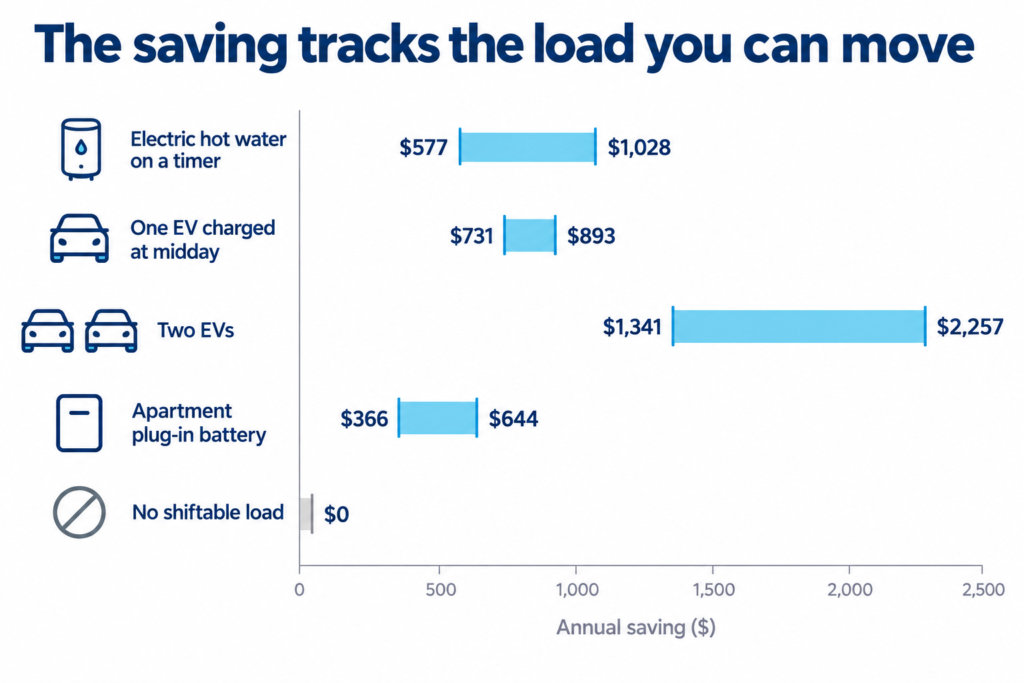
It depends on how much of your usage you can shift. The federal government’s own estimates give a rough guide:

Usage shifted into the windowSmaller home (1 person)Larger home (5 people)
About 10%~$150 a year~$400 a year
About 20%~$300 a year$500–$790 a year
About 25–30%~$400 a year$800–$1,100 a year

The pattern is clear. The more load you move, the more you save. Bigger homes with more appliances, an EV or a pool have the most to gain.

Bar chart of yearly Solar Sharer savings rising with load shifted, larger homes saving most.

Is the Solar Sharer Offer worth it for everyone?

No. The Solar Sharer Offer can help eligible households cut their bills, as long as they can move power use into the free window. The key is your daily routine.

Think about whether you can shift your energy use to the middle of the day. The more you move into the three-hour window, the more you could save on your energy bills. If you cannot shift much, you could end up worse off, because these plans often carry higher peak rates or supply charges. So compare the plan against your current one before you switch.

Split panel showing appliances using little of the free cap while a battery stores the full amount.

Why a battery gets the most out of it

In three hours it is easy to fall short of the full 24 kWh. You might run the dishwasher and a load of washing, but most homes will not get through the whole cap in one short window. A battery brings more flexibility. It can soak up power you would otherwise miss and let you use it whenever suits you.

Comparison panel showing who saves on the Solar Sharer Offer and who should compare plans first.

Pair the Solar Sharer Offer with a battery and the free window becomes your cheapest source of stored power, day or night, and don’t worry you have not missed the battery rebate.

If you want the full background on free daytime power and who benefits most, read more here.

Lenergy staff member, Ziad standing in front of solar panels smiling

Frequently Asked Questions

What is the Solar Sharer Offer and how do the 3 free hours work?

The Solar Sharer Offer gives eligible households at least three hours of free electricity a day, capped at 24 kWh. The window is 11am to 2pm in NSW and South East Queensland, and 12pm to 3pm in South Australia. You need a smart meter and you opt in through your retailer. No solar panels needed.

Which appliances should I run during my 3 free energy hours?

Your heaviest users give the best return: hot water, EV charging, dishwasher, washing machine, dryer and pool pump. Heating or cooling your home in the window helps too. Use timers or smart settings so they run even when you are out. Check whether your hot water or pool pump is on a controlled load first.

Can I save even more by combining the offer with a home battery?

Yes, and it is the single best way to maximise it. A battery stores free midday power for use at night, so you capture far more of the 24 kWh cap than appliances alone can. The right size matters most.

What Does a NatHERS Rating Actually Mean?

When it comes to the energy efficiency your home gets scored on two things: how comfortable it stays without the assistance of air conditioning, and how much energy it uses.

That’s your NatHERS rating and it’s actually two separate scores. A new interest-free loan can now help you fund the assessment and more importantly, the upgrades that lift it.

This guide covers:

  • what a NatHERS rating actually measures, and the two parts that make it up
  • how the Whole of Home rating works, and why solar and battery system move the needle
  • how the score is calculated
  • how the NSW $15,000 interest-free loan can pay for the upgrades, and who qualifies

What is a NatHERS rating?

NatHERS stands for the Nationwide House Energy Rating Scheme. It is Australia’s main system for rating how energy efficient a home is. An accredited assessor runs your home through approved software and gives it a score. There are two parts:

  • Thermal star rating, out of 10. This looks at the building itself, things like insulation and orientation.
  • Whole of Home rating, out of 100 or more. This looks at the energy your home uses and produces across a year, including your solar and battery.
Two panels showing a NatHERS rating: a 10-star thermal score and a Whole of Home score out of 100.

What does the Whole of Home rating measure?

This is where solar and a battery earn their keep. The thermal rating only looks at the building fabric, things like insulation, windows and orientation. The Whole of Home rating goes further. It counts:

  • heating, cooling and hot water
  • lighting, cooking and plug-in appliances
  • pool and spa equipment, if you have it
  • your solar generation and battery storage

It adds up your predicted energy use, then subtracts what your solar produces. The result shows your real running costs and how much you lean on the grid.

Icon grid of what a Whole of Home rating counts, from heating and hot water to solar panels and battery.

How do solar and a battery change the score?

They lift it, often a lot. Here is how it works:

  • A score of 100 means a net-zero home, one that makes as much energy as it uses across the year.
  • A well-sized solar system paired with a battery can push the score past 100. That means your home produces more than it uses.
  • Solar offsets your daytime use. A battery stores the extra, so you draw less from the grid at night.
  • A well-insulated home needs less solar and battery capacity to hit a high score, so the two work together.

The payoff shows up on your bill. Read our guide on 5 Practical Reasons to Add a Battery to Your Solar System. Over time, the savings build.

A scale from high grid reliance up past net zero, showing how solar and a battery lift your score.

How is the rating calculated?

The rating is based on your home’s design and systems, not the way you live in it. An assessor uses approved software built on CSIRO research. It weighs:

  • your local climate zone
  • your appliance efficiency
  • your solar and battery system specs

One thing to remember. The rating is a prediction made before or during a build, not a meter reading taken after. How you use the home still shifts the real numbers.

Diagram showing climate zone, appliances and solar specs feeding into a predicted NatHERS score.

What is the NSW interest-free loan?

The recently announced NSW Home Energy Saver loan offers eligible households up to $15,000 at 0% interest, with no fees, repayable over up to 10 years. You can use it to fund the upgrades that improve your rating. Eligible upgrades include:

  • rooftop solar
  • a household battery
  • the NatHERS assessment itself
  • heat pump hot water, reverse-cycle air conditioning, ceiling insulation and switchboard upgrades
Snapshot of the NSW Home Energy Saver loan: $15,000, 0% interest, 10 years, and eligible upgrades.

To qualify, you need to be an owner-occupier or a landlord with combined household taxable income up to $210,000. Extra discounts are expected to be implemented for lower-income households and concession card holders are expected, and renters may access support with their landlord’s approval. 

You apply through an approved lender after getting quotes from approved suppliers Brighte or Plenti. If upfront cost is the thing holding you back, this is built to solve exactly that. 

Want to learn more about whether solar and a battery would be right for you? Read more about in our article Is Your Home Ready for Solar Panels?

A team member from Lenergy standing in front of a panel, smiling with a black branded polo with a Lenergy logo

Frequently Asked Questions

What is a NatHERS rating and why do I need one?

It is an energy score for your home. The thermal part rates comfort out of 10 stars. The Whole of Home part rates your total energy use out of 100 or more, and counts your solar and battery. You usually need one for building approval on a new home or a major renovation.

How many stars do you need to pass a NatHERS assessment?

For many new homes, the current thermal minimum is 7 stars under the National Construction Code. Some areas also set a minimum Whole of Home score. Your assessor will confirm what applies to your address.

How much does a NatHERS assessment cost in Australia?

The standard cost ranges from around $350-$700, however, the cost depends on the home, the plans and the assessor. The NSW interest-free loan can cover the cost of the assessment itself.

How NSW’s $15,000 Interest-Free Solar Loan Works

The NSW Government has introduced the Home Energy Saver Scheme to help homeowners with the upfront cost of electrifying their homes. From 17 June 2026, eligible households can borrow up to $15,000 for solar and other energy upgrades at zero interest, then repay it over as long as ten years. Here is how the NSW $15,000 interest-free solar loan works, who qualifies, and how to apply.

What is the NSW Home Energy Saver loan?

The Home Energy Saver loan is an interest-free loan of up to $15,000 per property, funded by the NSW Government and delivered by two private finance providers, Brighte and Plenti. The key features are:

  • Up to $15,000 per property, with no interest charged.
  • No fees. No upfront fee, no monthly fee, and no penalty for paying it off early.
  • Up to ten years to repay, so you only ever repay what you borrow.
  • A loan, not a grant. Applications opened on 17 June 2026, with no closing date set.

One point matters more than people expect: you never handle the money yourself.

  • The finance provider pays your accredited installer directly.
  • Payment is released only once you and the installer both confirm the work is done.
  • You can bundle several upgrades into one loan up to the $15,000 cap.
  • If your project costs more, you pay the difference to the installer.
Icon grid showing the NSW Home Energy Saver loan: up to $15,000, 0% interest, up to 10 years, no fees.

Who is eligible for the NSW solar loan?

To take the loan, you need to tick every box below:

  • You own the property, as either an owner-occupier or a landlord.
  • Your combined annual taxable household income is below $210,000.
  • You are an Australian citizen or permanent resident.
  • You pass the finance provider’s credit check.
  • The property is in NSW.
  • The property is not social housing or used for short-stay accommodation.

A couple of situations to note:

  • Renters cannot take the loan, though they may access a separate discount with their landlord’s permission.
  • Strata or apartment dwellers can apply, but you must get owners-corporation approval for the upgrade yourself.

What can you spend the loan on?

The scheme covers thirteen upgrade types:

  • Rooftop solar
  • A home battery
  • A switchboard upgrade
  • A heat pump water heater
  • A solar water heater
  • A reverse-cycle air conditioner
  • An induction cooktop
  • An EV level 2 charger
  • A DC ceiling fan
  • Ceiling insulation
  • Draught-proofing
  • Double glazing
  • A NatHERS home energy assessment

Each lender currently funds a narrower part of this list while more categories are added, so check what your provider offers before you commit. If solar is your first step, it helps to work out what size solar system you actually need before you ask for quotes.

One detail worth knowing: any federal or NSW incentives you qualify for are applied before the loan amount is worked out, which can reduce how much you need to borrow.

 Icon grid of the 13 upgrades the NSW Home Energy Saver loan covers, from rooftop solar and batteries to insulation.

How do you apply for the NSW Home Energy Saver loan?

The process runs in a clear order:

  • Check your eligibility using the loan guidelines or the NSW Energy Savings Finder.
  • Choose your upgrade. The NSW Energy Savings Calculator can help you compare savings.
  • Pick a finance provider, either Brighte or Plenti.
  • Get quotes from approved suppliers.
  • Finalise your application on the provider’s website.

The step most people miss is that you can only apply through a program-approved, accredited vendor. The vendor refers you to the finance provider, who then sends you a unique link to finish the application. Often the easiest route would be to reach out first to a trusted local installer and take advantage of their experience to enter into the scheme.

Five-step timeline to apply for the NSW Home Energy Saver loan, from checking eligibility to finalising via the provider.

If you are weighing up incentives, it is worth understanding how the federal and NSW battery rebates stack alongside this scheme.

Is the solar loan worth using?

Most loans for a solar and battery system currently start at around 8% interest. On a $15,000 loan repaid over ten years, that adds up fast. At 8%, you would pay roughly $182 a month and hand over close to $6,800 in interest on top of the $15,000 you borrowed. Under the Home Energy Saver loan you pay none of that. The $15,000 is all you ever repay, so the saving is close to $6,800 compared with a typical loan.

Bar chart comparing a typical 8% solar loan with NSW's 0% loan, showing close to $6,800 saved on $15,000.

A solar and battery system is still the most effective way to bring down your electricity bills, and with the rebates available right now the value on offer to homeowners is excellent. Between the interest-free loan and existing federal and state incentives, there has rarely been a better time to consider a system. The smartest order is simple:

  • Speak with a specialist in the field.
  • Settle on your upgrades.
  • Apply through an accredited Brighte or Plenti vendor.

Considering a battery?  Read our article on the Mistakes to Avoid When Buying a Solar Battery

Frequently Asked Questions

Who is eligible for the NSW $15,000 interest-free solar loan?

You need to own the property as an owner-occupier or landlord, have a combined annual taxable household income of up to $210,000, be an Australian citizen or permanent resident, and pass the finance provider’s credit check. The property must be in NSW and cannot be social or community housing or used for short-stay accommodation. Renters are not eligible for the loan, but they can access the separate $4,000 discount with their landlord’s permission.

How do I apply for the NSW Home Energy Saver loan?

Start by checking your eligibility through the loan guidelines or the NSW Energy Savings Finder, then choose your upgrade and a finance provider, Brighte or Plenti. You apply through a program-approved, accredited vendor, who refers you to the provider. The provider then sends you a unique link to complete the application. The loan money goes straight to your installer once the work is confirmed, so you never receive cash yourself.

Can I use the Home Energy Saver loan for both solar panels and a battery?

Yes. You can bundle several eligible upgrades, including rooftop solar and a home battery, into a single loan up to the $15,000 cap. If the combined cost is higher than $15,000, you pay the difference to your installer. For help sizing a system to your home and budget, see how to choose a solar battery size.

Solar Racking: What Australian Homeowners Need to Know

What’s actually holding your solar panels to your roof?

It’s called racking. The rails, brackets and roof interfaces that carry your panels through 25 years of Australian weather. Most homeowners never think about it. Until something goes wrong.

Choosing the right solar panel mounting system in Australia matters more than most homeowners realise, and Clenergy, ranked the number one solar mounting brand in Australia for 2025 by market analyst SunWiz, is built to get it right.

This guide covers:

  • what solar racking is and why it matters
  • how to choose a mounting system, and why Clenergy leads
  • the best racking for ColorBond, tile and other Aussie roofs
  • how racking handles harsh Australian conditions
  • what the warranty actually covers, now confirmed at 25 years
  • how to know your solar installation is done right

What Is Solar Racking and Why Does It Matter?

A typical solar racking setup consists of three parts:

  • solar mounting rails that run across the roof
  • brackets and clamps that grip each panel
  • roof interfaces that fix it all down through the tiles or metal sheet

If your panels are the engine, the racking is the chassis. It does the structural work and gets none of the glory. Skimp on it and the costs show up later:

  • water can leak in around each roof penetration
  • panels can shift or lift in strong wind
  • cheap solar panel brackets can corrode early near the coast
  • the extra solar system roof load needs hardware that can carry it
Side-on cross-section of a solar panel roof mount showing labelled mounting rail, bracket and clamp, and roof interface with caption explaining racking.

How to Choose a Solar Panel Mounting System in Australia

Nearly every solar installer in Australia has a go-to racking brand they trust. Ours is Clenergy, and here is why:

  • founded in Melbourne in 2007, now selling in more than 50 countries 
  • ranked the number one solar mounting brand in Australia for 2025 by market analyst SunWiz
  • built from tough anodised aluminium racking and stainless steel
  • parts that click together, which Clenergy says can cut install labour by up to 40 percent 

Why does installer-friendly hardware matter to you? For a few practical reasons:

  • less time on your roof means less mess and fewer mistakes
  • quality solar mounting hardware in Australia holds up over decades
  • a solar installer in Australia who knows the system fits it right the first time
Four credential badges highlight Clenergy’s credibility: founded in Melbourne in 2007, Australia’s top solar mounting brand, durable build, and faster installation.

What Solar Mounting System Is Best for ColorBond and Tile Roofs?

One of Clenergy’s biggest strengths is that the same system suits nearly every Australian roof. Only a small interface part changes to match yours. It covers:
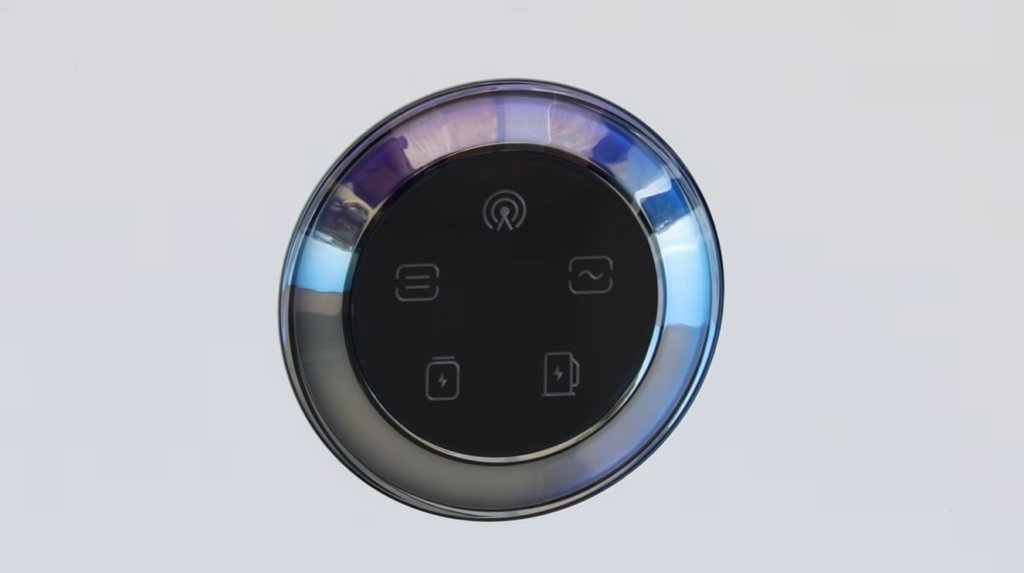
  • ColorBond and other steel roofs, including Klip-Lok and corrugated profiles
  • tile roofs, including Roman, flat and slate, for solar tile roof mounting
  • all of these roof types are backed by the same 25-year Clenergy product warranty

A few things worth knowing when you roof mount solar panels in Australia:

  • on a ColorBond roof, the right solar brackets clamp to the ribs with minimal roof penetration
  • on tile, the interface lifts a tile and bolts into the rafter below, then seals
  • you can choose a flush mount for a clean look or a tilt mount to improve the angle

Roof angle changes how much power you make, so read our guide on roof orientation, pitch and shading before you settle on a layout.

2x2 icon grid showing supported Australian roof types: ColorBond/Klip-Lok, corrugated metal, tile and trapezoidal metal, with mount options.
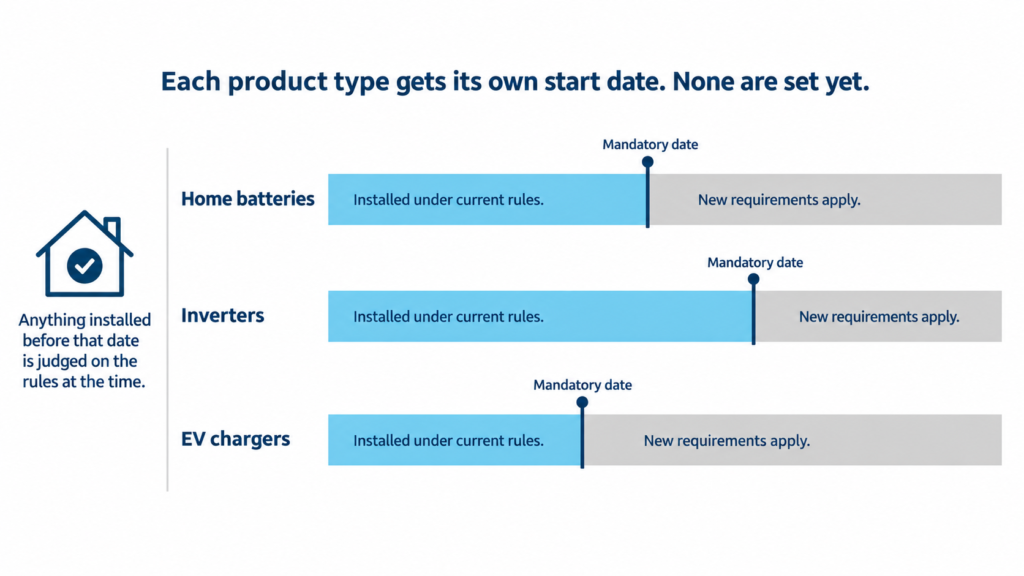
How Solar Racking Holds Up to Australian Conditions

Australian weather is hard on rooftop hardware, from coastal salt to inland heat to cyclonic wind. Clenergy is built for it:
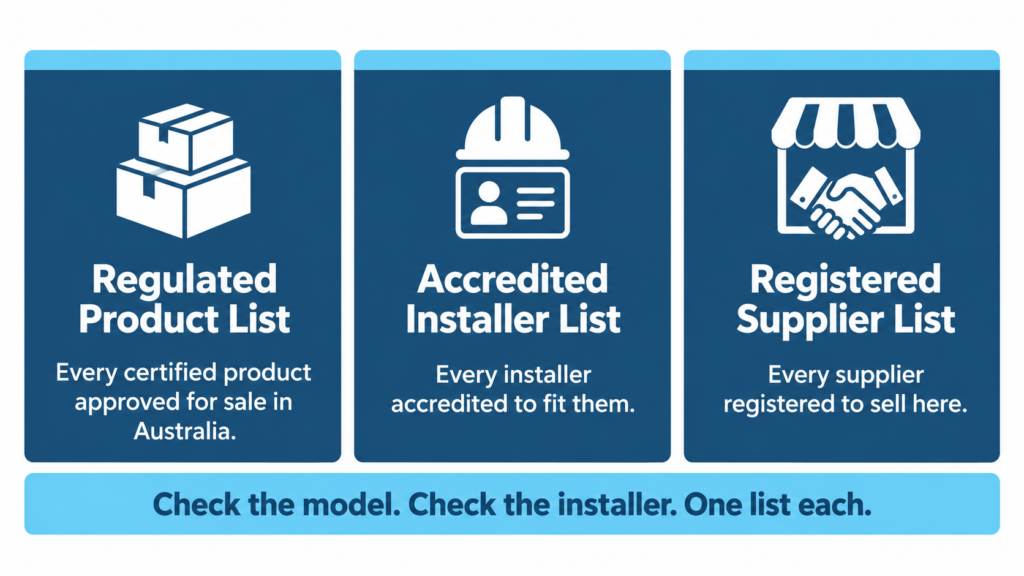
  • aluminium parts warranted for the full 25 years, even in harsh coastal air
  • a galvanised steel option for tougher environments
  • wind-rated solar mounting said to handle up to 88 metres per second
  • engineered to meet the AS/NZS wind load standard

Where you live changes what you need:

  • coastal homes in NSW face salt corrosion, so component choice matters
  • high-wind and storm-prone areas need properly rated, well-fixed racking

Severe weather hits your panels too, which we cover in our article on solar panels and storm or hail damage.

Four feature cards highlight solar racking durability: coastal warranty, marine-grade materials, 88 m/s wind rating, and AS/NZS compliance.

Does Solar Racking Affect My Roof Warranty?

Two different warranties come up here, and it helps to keep them apart. First, your roof warranty:

  • every install needs roof penetrations or clamps, and poor workmanship there can cause leaks and put a roof or building warranty at risk
  • done correctly, by an accredited installer using proper flashing and sealing, your roof stays sound
  • always ask how your installer handles roof penetration and waterproofing

Second, the Clenergy product warranty:

  • Clenergy Australia warrants its PVezRack SolarRoof and SolarTerrace racking for 25 years, per the product warranty last updated 10 July 2024
  • aluminium and stainless steel components are covered for the full 25 years across all corrosivity categories
    • Category 1 and 2: low corrosion, think dry inland areas
    • Category 3: medium, general urban and suburban
    • Category 4: high, near the coast or industrial areas
    • Category 5: very high, beachfront and salt-heavy marine air
  • in the harshest coastal corrosivity zones, some galvanised steel and screw components carry shorter cover, so coastal homeowners should check which parts apply
  • cover holds only if the system is installed by an accredited installer and maintained as required, such as annual fastener checks

So the headline is simple: the official Australian warranty is 25 years for the core racking, with shorter cover only on specific steel parts in the most corrosive coastal categories. Ask your installer for the warranty document so you can see exactly what applies to your roof and your area.

Warranty matrix showing coverage by corrosivity zone, with 25-year cover for aluminium, reduced steel cover in coastal areas, and some exclusions.

Getting Your Solar Installation in Australia Right

A great solar installation in Australia comes down to the install as much as the gear. To know your solar racking is installed correctly:

  • check your solar installer is accredited with Solar Accreditation Australia
  • ask which racking brand and variant suits your roof, and ask for the warranty document
  • ask how they handle roof penetration, flashing and the roof load
  • look for neat, even rows of panels with tidy cable management

Is quality racking worth a little extra? For most homes, yes:

  • it is a small part of the total cost but carries a big share of the long-term risk
  • it matters most for coastal homes, complex roofs and long-term owners
  • the thing to avoid is cheap, unrated racking with no Australian standards compliance

Your racking is also the foundation for everything else on the roof. Whether you are adding solar battery storage in Australia now or planning EV charger installation down the track, it all sits on the mounting system.

If you are looking to find out whether your home is ready for a solar system, you can read more here.

A team member from Lenergy standing in front of a panel, smiling with a black branded polo with a Lenergy logo

Frequently Asked Questions

How long does solar racking last on an Australian roof?

Quality racking like Clenergy is built to outlast the panels. The official Clenergy Australia product warranty covers the racking for 25 years, and the aluminium and stainless parts are rated for the full term across every corrosivity category. In the harshest coastal zones, some steel components carry shorter cover, so check which parts apply to your address.

Does solar racking affect my roof warranty?

It can, if it is done badly. Every install needs roof penetrations or clamps, and poor workmanship there can cause leaks and put a roof or building warranty at risk. Done properly by an accredited installer with correct flashing and sealing, your roof stays sound. Always ask how your installer manages roof penetration and waterproofing.

What solar mounting system is best for ColorBond roofs?

For ColorBond and other steel roofing you want a system with brackets that clamp securely to the roof ribs and keep roof penetrations to a minimum. Clenergy’s Klip-Lok and corrugated interfaces are designed for exactly this, which is part of why it suits so many Australian homes. Your installer should match the right interface to your specific roof profile.

How do I know if my solar racking is installed correctly?

A few quick checks tell you a lot:

  • the installer can explain how they sealed every roof penetration
  • the installer is accredited with Solar Accreditation Australia
  • the rows of panels are neat and even, with tidy cable management
  • you have the racking warranty document and know what it covers
Is now a good time to install solar, or should I wait?

For most homeowners, the sooner your system is generating, the sooner it cuts your bills, so waiting rarely pays off. The main exception is if you plan to replace your roof in the next year or two. In that case, do the roof first, so the racking goes onto sound material and does not have to come off again later.